
Best overall for U.S. rate-table buyers: Zip2Tax Sales Tax Table - United States. Best for more precise ZIP matching: SalesTax+4® Sales Tax Table - U.S. Best for a live rate request: Sales Tax API - USA. Best for Canadian GST/HST table imports: GST/HST Table - Canada. These are distinct ways to supply rates to an e-commerce system, not interchangeable tools for every sales tax obligation.
- Zip2Tax is the best sales tax software for ecommerce teams that want to import a U.S. rate table into an existing system.
- Choose SalesTax+4® Sales Tax Table - U.S. when your workflow captures 9-digit ZIP codes rather than only 5-digit ZIP codes.
- Choose Sales Tax API - USA when your application needs to request a rate from a server instead of importing a table.
- Choose GST/HST Table - Canada for a Canadian table workflow; check other Canadian tax requirements separately.
Why this matters
A rate is only one input to a sales tax calculation. Before an e-commerce business charges tax, it must determine where it has an obligation to collect, whether the item is taxable, which jurisdiction applies and whether an exemption changes the transaction. A rate table or API response does not make those decisions for you.
That distinction should drive a 2026 purchase. If your checkout or finance system already handles tax decisions and needs rate data, a downloadable table fits a different job from a service that calculates and files tax. If your application requests rates during a transaction, an API fits a different workflow from a file you import on a schedule. Select the delivery method first; then check geographic coverage and location detail.
What makes the best sales tax software for ecommerce?
Use these criteria to assess the options before the comparison table:
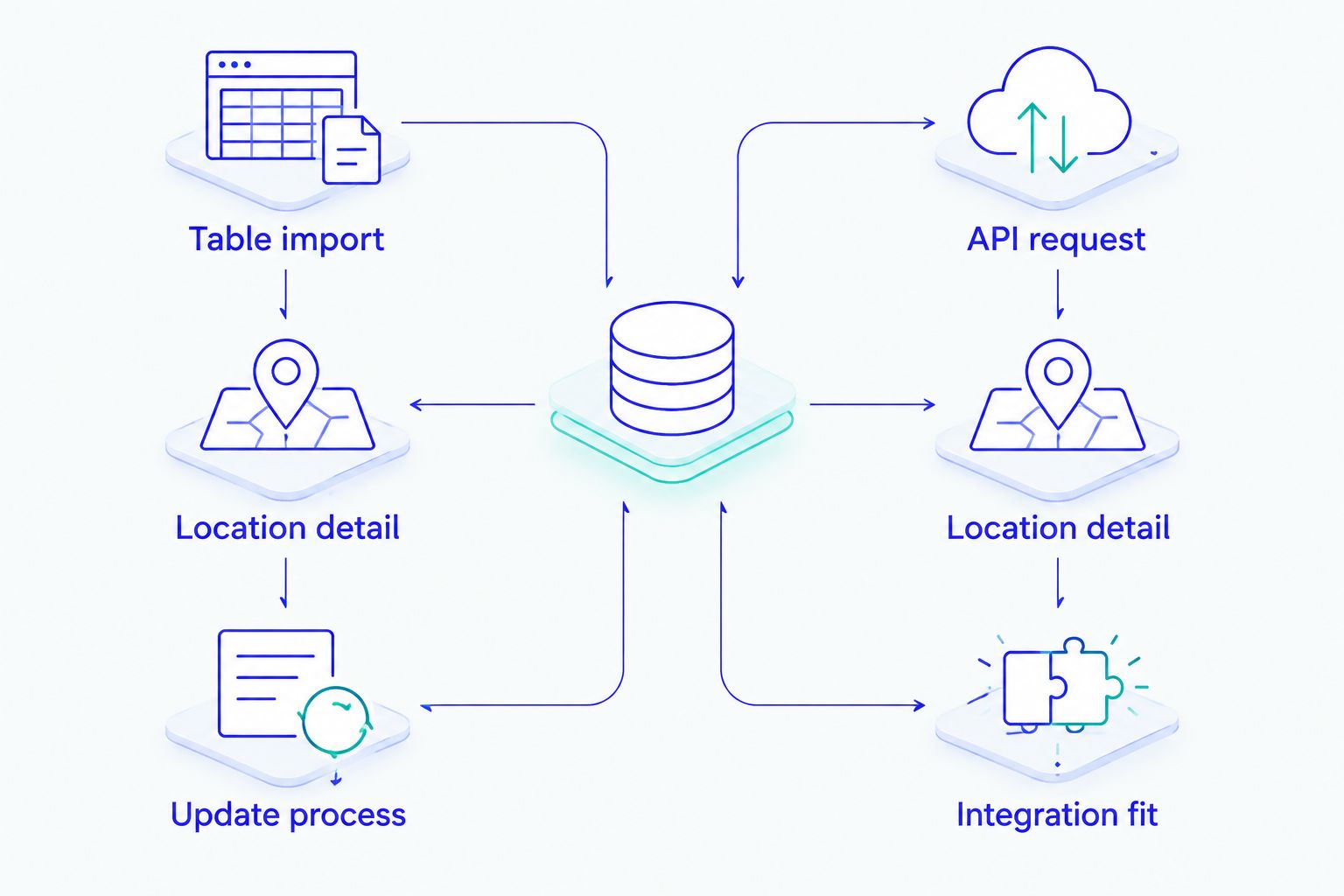
- Delivery method: Decide whether your system imports a downloadable table or requests a rate through an API. An import needs a process for replacing rate data; an API needs an application integration.
- Location detail: Confirm what location information your checkout collects. A 5-digit ZIP code and a 9-digit ZIP code are different inputs, and neither should be treated as a complete address without checking the jurisdiction rules that affect the sale.
- Geographic scope: Match the product to the places where you need rates. A U.S. table, selected-state table and Canadian GST/HST table answer different coverage questions.
- Update process: Ask when new rates become available, how they are delivered and who applies them to your production system. A current file sitting outside checkout does not update the rates checkout uses.
- Tax decisions outside the rate: Identify who handles nexus, product taxability, exemptions, sourcing and filing. Do not infer that a rate lookup performs those tasks.
- Integration fit: Check the file format or API response against the fields your system accepts. Confirm how your team will test a changed rate before it affects orders.
In 2026, the first technical question for a table buyer is straightforward: can your system ingest the data you plan to buy? Ask for the file layout, location fields and a sample of the intended import workflow before changing checkout logic. For an API buyer, establish which application sends the request and what it will do if a rate request fails. Those checks concern your implementation, not a claimed feature of any product below.
At a glance: four rate-data options
| Item | Best for | Standout feature | Key limitation |
|---|---|---|---|
| Sales Tax Table - United States | U.S. businesses importing a 5-digit ZIP table | Downloadable U.S. table | Your team must maintain the import workflow |
| SalesTax+4® Sales Tax Table - U.S. | U.S. businesses working with 9-digit ZIP codes | ZIP+4 table option | A checkout that captures only 5 digits cannot use the added ZIP detail |
| Sales Tax API - USA | Applications requesting U.S. rates as needed | Server-based rate lookup | Requires an API integration rather than a file import |
| GST/HST Table - Canada | Businesses importing Canadian GST/HST rates | Canadian GST/HST table | Its stated scope is GST/HST, not every Canadian tax decision |
The table compares the stated delivery method and scope, not calculation accuracy or filing capability. Verify the applicable jurisdiction and your own tax obligations before treating any returned rate as the amount to charge.
A practical 2026 decision starts with the path rate data takes into checkout. A table moves through a file import; an API moves through a request from your application. Neither path removes the need to validate the transaction to which the rate applies.


1. Sales Tax Table - United States: best for U.S. table imports
Zip2Tax Sales Tax Table - United States is the default pick when an e-commerce business wants downloadable U.S. rate data and already has a process for importing a table. The product information distinguishes this table from the separate 9-digit ZIP option. Start here if your system is built around a 5-digit ZIP table rather than live rate requests.
Sales Tax Table - United States pros:
- A single U.S. table fits a workflow that requires a U.S. file rather than separately selected state files.
- Downloadable data can be imported into an existing application without making a rate request for each lookup.
- The separate ZIP+4 product gives buyers a clear alternative when their location data supports more detail.
Sales Tax Table - United States cons:
- A file import is an operational task: someone must put updated data into the system that calculates orders.
- A 5-digit ZIP input does not contain the 4-digit ZIP extension.
- Rate data alone does not determine product taxability, exemptions or collection obligations.
Best for: U.S. retailers and e-commerce teams that own their checkout or finance-system table import. Verdict: Buy for that workflow in 2026; choose a different option if your application needs live requests or routinely uses 9-digit ZIP codes.
Before implementation, map each field your system reads to the supplied table format. Document where the current file is stored, how a replacement reaches production and how an order is checked after the import. A table cannot correct an import that leaves checkout reading an older file. If you need rates only for selected states, consider the separately listed single-state table instead of assuming a U.S.-wide file is the right input.
2. SalesTax+4® Sales Tax Table - U.S.: best for 9-digit ZIP workflows
SalesTax+4® Sales Tax Table - U.S. is the U.S. table option identified for 9-digit ZIP codes. It fits a system that collects and retains ZIP+4 data and needs its rate lookup to use that data. A 9-digit ZIP code consists of the 5-digit ZIP code plus a 4-digit extension; having the more detailed table does not supply the extension if your checkout never receives it.
SalesTax+4® Sales Tax Table - U.S. pros:
- Its stated 9-digit ZIP scope matches a workflow built around ZIP+4 inputs.
- It preserves the downloadable-table approach for teams that do not want to build a rate-request integration.
- It provides a distinct choice from the listed 5-digit U.S. table.
SalesTax+4® Sales Tax Table - U.S. cons:
- The added ZIP detail is not useful when orders arrive with only a 5-digit ZIP code.
- Your team still needs to import replacement files into the application using them.
- ZIP+4 detail does not replace checks for taxability, sourcing and exemptions.
Best for: U.S. e-commerce systems with usable 9-digit ZIP inputs and an established table-import process. Verdict: Buy when both conditions are met; hold if your address records do not contain the ZIP extension.
Check the location fields in actual order records before selecting this 2026 option. A checkout form, payment record and downstream tax system can hold different versions of the same address. Your lookup can use only the detail that survives that chain. Review how the system handles an order with incomplete ZIP information rather than assuming every customer supplies ZIP+4.
3. Sales Tax API - USA: best for live U.S. rate requests
Zip2Tax Sales Tax API - USA connects an application to its servers when a rate is needed. That makes it the relevant pick when your developers can send rate requests and use the response in an existing calculation flow. It is not the default for a business whose software already expects a downloaded table and has no API integration.
Sales Tax API - USA pros:
- The request-based delivery method fits applications that look up a rate during their own workflow.
- A team can connect its application instead of maintaining a table-file import for this product.
- Its stated U.S. scope separates it from the listed Canadian API product.
Sales Tax API - USA cons:
- It requires development work to send requests and handle responses.
- A request depends on the application and server connection working when the lookup is needed.
- A rate response does not, by itself, establish whether the sale is taxable or the seller must collect.
Best for: Developers adding U.S. rate lookup to an e-commerce application that already handles the other tax decisions. Verdict: Buy for a request-based integration in 2026; hold if your system accepts files but cannot call an API.
Before connecting checkout, specify what location your application sends, where it stores the returned rate and how it treats an unsuccessful request. Keep the transaction decision separate from the lookup: the applicable jurisdiction, item treatment and any exemption still need rules in your own process. For a buyer comparing APIs, examine the request and response fields rather than treating the word API as a substitute for a coverage check.
4. GST/HST Table - Canada: best for Canadian GST/HST imports
GST/HST Table - Canada is the listed table for Canadian GST/HST rates. It belongs on the shortlist when your e-commerce operation needs those rates in a file-based workflow rather than a Canadian API request. Its name defines the scope to check first: GST/HST.
GST/HST Table - Canada pros:
- It gives table-import buyers a Canadian GST/HST option alongside the U.S. tables.
- Its stated GST/HST focus makes the tax category clear during product selection.
- A file-based workflow suits a system already set up to ingest tax tables.
GST/HST Table - Canada cons:
- It is not presented as a complete answer to every Canadian indirect-tax requirement.
- Your team must maintain the import into the system that uses the rates.
- GST/HST rate data does not decide a transaction's tax treatment on its own.
Best for: Businesses that need Canadian GST/HST rate data in a table. Verdict: Buy for that defined need; hold until you identify any other provincial or transaction-specific requirements your business must handle.
Do not carry a U.S. ZIP-code lookup design into Canada unchanged. Identify the location information your Canadian checkout collects and the fields your tax system needs, then confirm the table fits that workflow. If your application requests Canadian rates instead of importing them, the separately listed Sales Tax API - Canada is the relevant delivery option to assess. The choice is about integration and tax scope, not a claim that one delivery method produces a better legal determination.
How we ranked the options
The ranking starts with the brand's stated buyer priority: downloadable U.S. sales and use tax tables first, then an API for request-based lookup. Within the table choices, it separates a general U.S. import from a 9-digit ZIP workflow; the Canadian GST/HST table fills a different geographic need. Each option has a distinct job, so the order is a starting point for selection rather than a claim that the first product fits every checkout.
No product here was ranked on a claimed accuracy percentage, filing feature or rate-update interval. Those details are not established by the supplied product descriptions. In 2026, ask for the current coverage, file or response format and update procedure before committing an implementation. Test your own tax rules and location inputs against the delivery method you select.
Which sales tax software should you choose?
Choose Zip2Tax Sales Tax Table - United States if your U.S. checkout imports a 5-digit ZIP rate table. Move to SalesTax+4® Sales Tax Table - U.S. when your system actually uses 9-digit ZIP codes. Choose Sales Tax API - USA when your application must request U.S. rates as part of its workflow; choose GST/HST Table - Canada when your defined requirement is a Canadian GST/HST file.
If your main need is automated decisions about nexus, product taxability, exemptions or filing, do not buy rate data expecting it to perform that work. Write down those requirements separately before you select a rate source. That boundary is the most useful way to narrow the best sales tax software for ecommerce in 2026.
FAQ
What's the best sales tax software for ecommerce businesses using tax tables?
Zip2Tax Sales Tax Table - United States is the default pick here for a U.S. business that imports a 5-digit ZIP rate table. Choose the ZIP+4 table instead when your system captures and uses 9-digit ZIP codes.
Is a sales tax table better than an API for checkout?
A table is the better fit when your system imports files; an API is the better fit when your application requests rates. The deciding factor is the delivery method your checkout can maintain and test.
Does a 9-digit ZIP table supply missing ZIP+4 information?
No. A 9-digit ZIP table needs usable 9-digit ZIP inputs to make use of that additional detail. Check what your checkout captures and passes to the tax lookup.
Does a sales tax rate lookup determine whether I have nexus?
No. Rate lookup supplies rate data, while nexus concerns whether your business has an obligation to collect tax. Establish the obligation separately before applying a rate to a sale.
Can a U.S. sales tax table handle Canadian GST/HST?
Choose a Canadian GST/HST product for a Canadian GST/HST table requirement. The listed U.S. tables and Canadian GST/HST table serve different geographic and tax scopes.
Does the Canadian GST/HST table cover every Canadian tax requirement?
No such coverage is established by the product information provided. Identify the taxes and transaction rules that apply to your sales, then confirm the table's scope against them.
What should I check before integrating a sales tax rate API?
Check the location data your application sends, the response fields it needs and how it handles an unsuccessful request. Confirm current coverage and your separate rules for taxability, exemptions and collection.
One last thing
The rate source is not necessarily where a stale rate enters an order. For a table buyer, trace the file from delivery through import to the checkout calculation; for an API buyer, trace the location sent in the request through to the rate used on the order. In either case, test the complete path when rates change in 2026.