
Best for Shopify checkout: Shopify Tax. Best for downloadable rate tables: Zip2Tax. Best for a broader tax-automation workflow: Avalara AvaTax. The best sales tax software for Shopify in 2026 depends on where you calculate tax: inside Shopify, in a separate business system, or across both.
- Shopify Tax is the best sales tax software for Shopify sellers who calculate tax in Shopify checkout.
- Zip2Tax is best for sellers who need downloadable U.S. sales tax tables for systems outside Shopify.
- Avalara AvaTax is best for sellers evaluating tax calculation across multiple business systems.
- A rate table or lookup API supplies rates; neither should be mistaken for a complete filing workflow.
Why this matters
A Shopify seller can have more than one tax calculation to manage. Checkout is the visible one, but an order-management system, retail operation or other sales channel can also need rate data. The right purchase depends on which system makes the calculation and who maintains its tax settings.
That distinction matters in 2026 because a rate-data product is not the same purchase as checkout software or a filing service. If Shopify already handles your checkout calculation, buying another checkout-oriented tool does not answer a separate need for downloadable data. If your calculation happens outside Shopify, a tool confined to the Shopify workflow does not, by itself, supply the files your other system needs.
Use the comparison below to identify the job first. Then check geographic coverage, rate precision, update handling and integration responsibility before you commit.
What makes the best sales tax software for Shopify?
- Calculation location. Identify whether Shopify checkout, an external system or both need a rate. A download belongs in a workflow that can import and use it; an API belongs in one that can make a lookup request.
- Geographic coverage. List every U.S. state and Canadian jurisdiction relevant to your sales. Do not treat a U.S. rate product as Canada coverage, or assume that a Canadian GST/HST table answers every tax question on a Canadian order.
- Address precision. Decide whether a 5-digit ZIP table, a 9-digit ZIP option or another address-based method fits the calculation. A ZIP code alone should not be treated as proof that every applicable tax rule has been resolved.
- Rate updates. Establish who obtains new data, who imports it and when the calculation system starts using it. A downloadable file does not replace an update process.
- Tax scope. Separate rate lookup from product taxability, exemptions, registration decisions, returns and filing. Confirm each required function rather than assuming a sales tax label includes all of them.
- Integration ownership. Name the person or team responsible for setup, testing and exceptions. A Shopify checkout setting, a file import and an API connection are different implementation tasks.
For a first pass, write down where your orders enter, where the taxable amount is calculated and where returns are prepared. Those answers narrow the field faster than a feature count.
Shopify sales tax software at a glance
| Option | Best for | Standout feature | Key limitation |
|---|---|---|---|
| Shopify Tax | Tax calculation in Shopify checkout | Works within Shopify's tax workflow | Does not replace rate data needed by a separate calculation system |
| Zip2Tax | Downloadable rates for external systems | U.S. sales tax tables, including 5-digit and 9-digit ZIP options | Requires a separate system and process to use table data |
| Avalara AvaTax | Evaluating tax calculation across business systems | Tax calculation software for connected workflows | Integration fit and responsibilities need review for each system |
The table ranks each option for a different job, not as interchangeable ways to make the same Shopify checkout change. In 2026, confirm the current capabilities of any option against your actual checkout and external-system requirements before implementation.
1. Shopify Tax: best sales tax software for native checkout
Best for: A seller whose immediate task is calculating tax on orders placed through Shopify checkout.
Shopify Tax is the native starting point when your checkout runs on Shopify. It keeps the checkout tax question in the platform where the order is placed. That makes it the default option to assess before you add a separate calculation workflow to solve the same checkout problem.
Start with your Shopify tax settings and the jurisdictions where you are registered to collect. Then test representative orders against the rules that apply to your products and destinations. If you also take orders outside Shopify, document whether those orders use the same calculation process; do not assume that changing checkout settings updates an unrelated system.
Shopify Tax pros:
- Addresses tax calculation in the Shopify selling workflow.
- Gives a Shopify-only seller a clear place to begin configuration and testing.
- Avoids treating a downloadable rate file as a direct checkout integration.
Shopify Tax cons:
- A separate order system still needs its own rate-data or calculation plan.
- Sellers must check whether their taxability, exemption and filing requirements are covered by their full workflow.
- A native checkout tool does not remove the need to review registrations and collection settings.
For a seller with only Shopify checkout calculations to resolve, choose Shopify Tax first. If your finance team also imports rates into another system, keep that requirement on a separate checklist rather than forcing one tool to serve both jobs.
Verdict: Buy for the native-checkout use case after validating your settings and order tests; hold on adding a second calculation product until you can name the gap it fills.
2. Zip2Tax: best for downloadable sales tax rate tables
Best for: A Shopify seller that also needs U.S. sales tax rates in downloadable files for a separate business system.
Zip2Tax provides sales and use tax rate lookup tools, APIs and downloadable tax tables for U.S. and Canadian needs. Its U.S. catalog includes a nationwide sales tax table, single-state tables and SalesTax+4® table options. Those are distinct purchases from a Shopify checkout setting: the buyer needs a system that can consume the selected data.
Start by asking your technical owner how the external system imports a table. Check the file format it accepts, which fields it uses for a destination and whether its calculation can apply the right rate to an order. Then choose the coverage that matches the jurisdictions you need, rather than buying a broader file simply because you sell through Shopify.
The product descriptions distinguish a 5-digit ZIP table from 9-digit ZIP SalesTax+4® options. That difference is useful when you specify the data your importer expects. It is not a substitute for checking the address, product and jurisdiction rules that determine the tax due on a particular sale.
Rate maintenance deserves its own owner. For 2026 operations, record when a new file becomes available, who checks it, how it enters your calculation system and how you verify the result. A correct file that never reaches the active system does not fix an outdated calculation.
Zip2Tax pros:
- Offers downloadable U.S. tables for a workflow that calls for files rather than live lookups.
- Offers nationwide and single-state table products, so buyers can select the coverage their external system requires.
- Offers an API route when a separate system needs rate lookup instead of an imported file.
- Has a Canadian GST/HST table product for a separately defined Canadian data need.
Zip2Tax cons:
- A tax table is rate data, not a complete checkout, taxability and filing service.
- Your team must verify file compatibility, import steps and update responsibility.
- Do not assume a direct Shopify checkout connector from the existence of a table or API; confirm the exact integration you intend to build.
An API is the second path here, not a reason to skip the table decision. If your system makes a request when it needs a rate, review the U.S. or Canada API product that matches that need. If it imports files on an established schedule, review the relevant table instead. The supplied product descriptions identify what these products are for; your own integration plan must establish how you will use them.
The distinction is practical: downloadable tables feed an import process, while rate lookup feeds a request-based process. Neither choice decides on its own whether an order is taxable or whether a return must be filed.
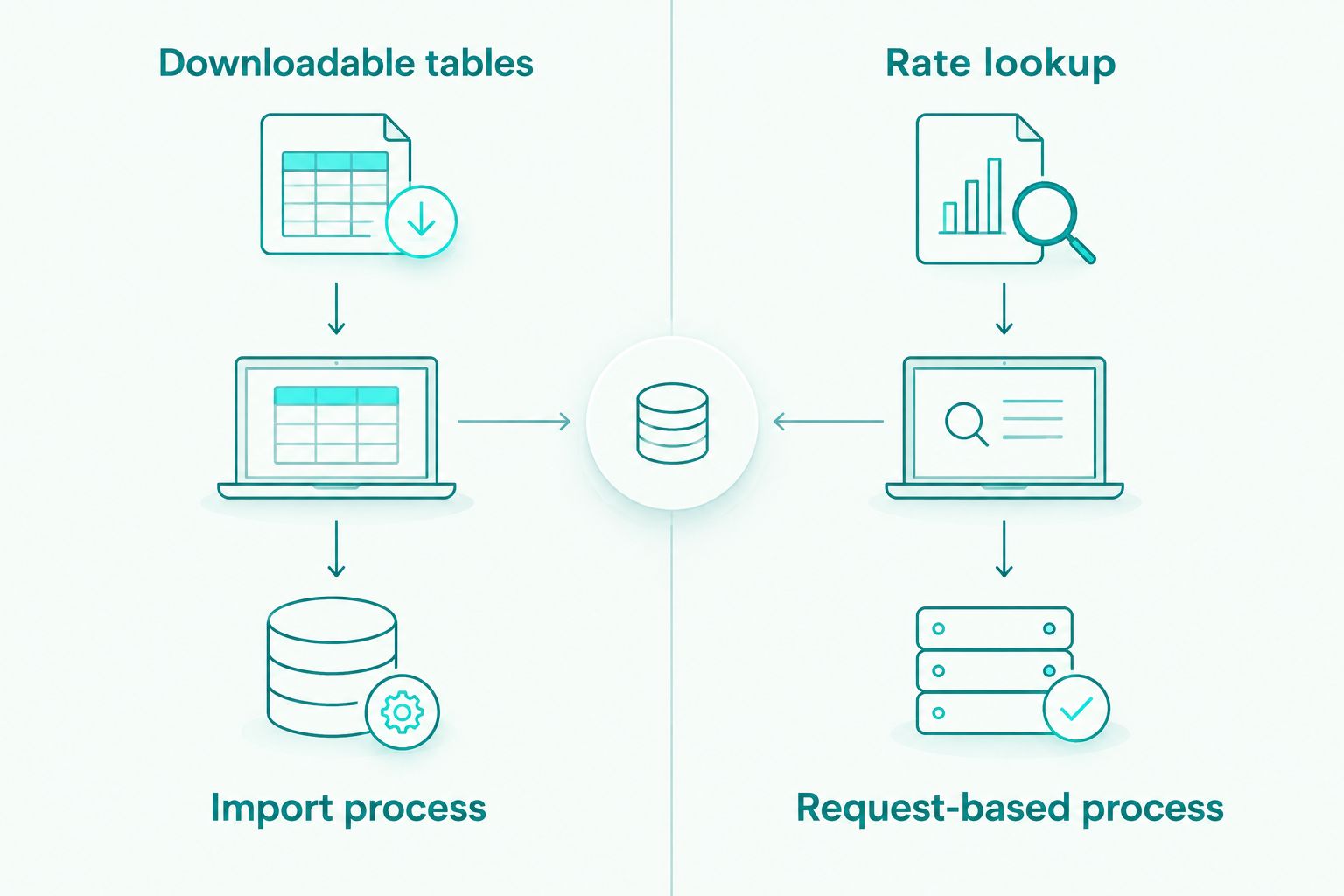
These products illustrate the file and API choices. Check each product's current options and confirm your required coverage and integration format before selecting one.


Verdict: Buy Zip2Tax for an external system that specifically needs downloadable rate tables; hold if your only defined requirement is a native Shopify checkout calculation.
3. Avalara AvaTax: best for a broader calculation workflow
Best for: A seller evaluating tax calculation across Shopify and other business systems, rather than sourcing a rate file alone.
Avalara AvaTax is tax calculation software. It belongs on the shortlist when the project spans more than a table import and you want to evaluate a connected calculation workflow across the systems that handle orders. It is a different procurement question from choosing a downloadable ZIP-code rate table.
Map each order source before a product demonstration. Identify where an address enters, where the taxable amount is determined, which system records the result and what happens when an order changes. Ask the vendor to show the specific integration path for each system in that map. A general statement that a platform supports tax calculation is not evidence that your full order flow is configured.
For a Shopify seller in 2026, the decision also needs a clear division of work. Determine what Shopify handles, what AvaTax would handle and which team would resolve a mismatch. Include returns and filing in the requirements discussion, but assess those functions separately from the calculation software itself.
Avalara AvaTax pros:
- Gives a multi-system tax-calculation project a dedicated product to evaluate.
- Fits a requirements discussion that extends beyond downloading rate data.
- Prompts a direct review of how calculations move through each order source.
Avalara AvaTax cons:
- It requires an integration review; the name of a tax product does not establish that your specific workflow is covered.
- A seller who only needs a file for an existing importer is solving a narrower problem.
- Calculation, returns and filing must be checked as separate requirements.
Verdict: Hold until the vendor demonstrates the integrations and tax functions on your requirements list; buy when those verified capabilities match the broader project.
How these picks were ranked
The ranking follows the location and scope of the tax job. Shopify Tax comes first for a seller asking how to calculate tax in Shopify checkout. Zip2Tax comes first for a different buyer: one that already has, or is building, an external system that needs downloadable U.S. rate data. Avalara AvaTax is the broader calculation candidate to assess when the work crosses business systems.
That is why there is no single feature-count winner. A table cannot perform an import for you; a native checkout setting cannot populate a separate system's rate file. In 2026, rank the option that addresses your named calculation point ahead of one with functions you have not assigned to a process.
Use the same questions for each candidate: What data enters the calculation? Which system receives the result? Who updates the configuration? How will you test a changed rate or an exception? An answer tied to your actual order flow is more useful than a generic claim about coverage.
Which sales tax software should you choose?
Choose Shopify Tax as the default if Shopify checkout is your only identified calculation point. It directly addresses the setting you need to configure. Do not add another product until you can describe the additional data, integration or tax function it must provide.
Choose Zip2Tax when an external system needs downloadable sales tax tables. Decide whether nationwide or single-state U.S. coverage fits the requirement, then confirm the file and update process with the person maintaining that system. Evaluate its API separately if the system calls for live rate lookup rather than imports.
Evaluate Avalara AvaTax when your requirement is connected tax calculation across business systems. Require a demonstration of the order flow and an explicit account of what remains your team's responsibility. Those checks make the decision more precise than choosing by brand recognition.
FAQ
What's the best sales tax software for Shopify checkout in 2026?
Shopify Tax is the starting choice for tax calculation in Shopify checkout. Test your tax settings against your products, destinations and collection requirements before relying on the result.
When should a Shopify seller use a downloadable sales tax table?
Use a downloadable sales tax table when a separate system needs to import rate data. Confirm its file requirements, geographic coverage and update process before selecting a table.
Is Zip2Tax a replacement for Shopify Tax?
Zip2Tax is a rate-data, lookup and API provider, not a like-for-like replacement for Shopify's native checkout workflow. Choose it for a defined table or lookup requirement and confirm how your system will use the data.
What's the difference between a sales tax table and an API?
A table is downloaded for a system to import, while an API lets a connected system request a rate. The better choice depends on how your calculation system obtains data.
Does a 9-digit ZIP tax table settle every sales tax question?
No. A 9-digit ZIP option addresses the rate-data format, but product taxability, exemptions and filing remain separate questions to resolve in your workflow.
Can a Shopify seller use U.S. sales tax data for Canadian orders?
No. Define Canadian tax requirements separately from U.S. sales tax coverage. Zip2Tax lists Canadian GST/HST table and Canada API products as distinct options.
Does tax calculation software file sales tax returns?
Do not assume that it does. Verify calculation, return preparation and filing as separate functions for the product and workflow you are considering.
One last thing
Before selecting a product for 2026, write one sentence naming the system that needs the rate. If the answer is Shopify checkout, start with its native tax workflow. If the answer is an external importer, specify the table it can accept. If several systems need a shared calculation process, evaluate the integration across every order source. That sentence prevents you from buying a solution for the wrong part of the tax process.