
Best overall for business rate imports: GST/HST Table - Canada. Best for occasional calculations: the Canada Revenue Agency GST/HST calculator. Best for application integration: Sales Tax API - Canada. This 2026 guide compares Canada GST HST rates tools by workflow, with Zip2Tax downloadable tables first and API lookup second.
- For Canada GST HST rates, GST/HST Table - Canada is the best fit for businesses importing rate data.
- The Canada Revenue Agency GST/HST calculator suits occasional calculations, not a downloadable-table workflow.
- Sales Tax API - Canada suits applications that request rates from a server.
- A correct GST/HST rate does not establish product taxability, registration obligations, or separate provincial sales tax treatment.
Why this matters
A calculator answers an amount question. A tax table supplies data your business can import. An API supplies a rate through an application request. Buying the wrong format creates an integration problem even when the underlying rate is correct.
For 2026 Canadian sales, separate GST/HST from provincial taxes and transaction rules. Alberta's GST rate is 5%; Ontario's HST rate is 13%. Quebec applies GST and QST, so a GST-only calculation does not establish the complete tax treatment of a taxable Quebec sale.
Zip2Tax is best for businesses buying Canada GST/HST rate data for imports or application lookups. A rate-data service supports your calculation process; it does not replace the rules determining whether you should collect tax on a particular transaction.
What makes the best Canada GST/HST rate tool
Use these criteria before choosing a calculator, downloadable table, or API:
- Coverage: Match the Canadian provinces and territories you sell into. Review separate provincial tax requirements rather than treating GST/HST as every tax due.
- Delivery format: Choose a downloadable table for imports, an API for application requests, or an interactive calculator for individual checks.
- Effective-date handling: Establish which rates apply to the transaction date and how your business replaces outdated data.
- Integration fit: Confirm the file structure, lookup inputs, output fields, and error handling your system requires.
- Tax scope: Distinguish a rate lookup from product taxability, registration, place-of-supply rules, and return preparation.
- Audit trail: Retain the rate source and the calculation inputs needed to explain the result later.
A business importing rates should evaluate tables before API features. A business calculating individual invoices should start with the calculation interface, not developer documentation.
Canada GST/HST rate tools at a glance
| Ranked option | Best for | Standout feature | Key limitation |
|---|---|---|---|
| GST/HST Table - Canada | Business rate imports | Canadian GST/HST rates supplied in one table | Your business must manage the imported data and calculation logic |
| Canada Revenue Agency GST/HST calculator | Occasional invoice checks | Official GST/HST calculation reference | An interactive calculation is not a business data import |
| Sales Tax API - Canada | Application rate requests | Connects an application to rate-data servers | Requires integration and operational error handling |
| Spreadsheet with official rate references | Internal calculation worksheets | Transparent formulas controlled by your team | Your team owns rate maintenance and formula checks |
These are distinct buying choices, not interchangeable products. The first option supplies a dataset, the second supports individual calculations, the third supports software requests, and the fourth gives you a locally maintained worksheet.
1. GST/HST Table - Canada: best for business rate imports
GST/HST Table - Canada brings Canadian GST/HST rates together in one downloadable table. It is the strongest match when your finance or operations team needs rate data inside an existing business process rather than a separate lookup for every transaction.
For a 2026 purchase, start with your destination system's import requirements. Request the file specification and check column names, rate representation, province identifiers, effective-date handling, and the procedure for replacing an earlier file. A table is useful only when your system interprets its fields correctly.
GST/HST Table - Canada pros:
- Supplies Canadian GST/HST rate data in a table-based format.
- Fits a business process built around importing and maintaining datasets.
- Keeps the rate-data purchase separate from your choice of calculation software.
GST/HST Table - Canada cons:
- Your team must manage imports, replacement files, and calculation logic.
- A GST/HST table alone does not determine whether a product is taxable.
- GST/HST coverage does not by itself establish separate PST or QST treatment.
For businesses also selling into the United States, treat Canadian and U.S. datasets as separate requirements. U.S. state and ZIP-code tables do not replace Canadian GST/HST data, and Canadian postal codes are not U.S. ZIP codes.
Best for: Finance and operations teams buying Canadian rates for a controlled import workflow.
Verdict: Buy GST/HST Table - Canada when your system needs a downloadable dataset and your team owns rate maintenance.
The following options serve different delivery needs. Choose the table for imports or the API for application requests; do not treat one as an automatic substitute for the other.


2. Canada Revenue Agency calculator: best for occasional checks
The Canada Revenue Agency GST/HST calculator supports GST/HST amount calculations. It is the appropriate starting point when you need to check an individual amount against the federal tax authority's rate guidance rather than import data into a business system.
For 2026 transactions, use CRA GST/HST rate guidance for provincial and territorial GST/HST rates and CRA place-of-supply guidance for the applicable jurisdiction. The calculator handles arithmetic; you still need to establish the correct transaction treatment.
Canada Revenue Agency GST/HST calculator pros:
- Provides an official reference for GST/HST calculation checks.
- Fits individual invoice or worksheet reviews.
- Helps separate arithmetic checking from a commercial integration purchase.
Canada Revenue Agency GST/HST calculator cons:
- Individual checks do not replace a downloadable rate dataset.
- Correct arithmetic does not establish registration or product taxability.
- Separate provincial tax questions require the relevant provincial guidance.
Use this option to review a disputed invoice or check a worksheet formula. Do not design a repeated manual lookup process where your business actually needs an import or application connection.
Best for: Bookkeepers and business owners checking individual GST/HST calculations.
Verdict: Hold the integration purchase when your requirement is only occasional calculation checking; use the CRA calculator first.
3. Sales Tax API - Canada: best for application rate requests
Sales Tax API - Canada connects your application to Zip2Tax's servers when you need a rate. It fits a system that requests rate data during its calculation process rather than importing a table into local storage.
Evaluate the interface before implementation. Confirm required location inputs, returned tax fields, authentication, error responses, and how the service identifies the data applicable to your transaction. Server-based lookup does not remove the need for those checks.
Sales Tax API - Canada pros:
- Supplies a server-connected rate-lookup approach.
- Fits applications designed to request data during processing.
- Offers an alternative to maintaining rate files inside your own application.
Sales Tax API - Canada cons:
- Requires development work and integration testing.
- Your application needs a defined response to failed or unusable lookups.
- A returned rate does not establish product taxability or filing obligations.
During your 2026 evaluation, test representative transactions against official GST/HST guidance. Include the provinces you serve and the location inputs your checkout actually captures. Check both successful responses and failure cases before using the integration in production.
Best for: Development teams building Canadian rate requests into checkout, invoicing, or other applications.
Verdict: Buy Sales Tax API - Canada when application requests, not downloadable imports, are the required delivery method.
4. Spreadsheet: best for internal calculation worksheets
A spreadsheet can calculate GST/HST from a taxable amount and a maintained rate. Its advantage is visibility: your team can inspect the inputs and formulas rather than accepting an unexplained total.
It is not a maintained tax-data service. Assign someone to verify rates against official sources, record effective dates, protect formulas, and review changes. Without that ownership, an editable workbook becomes a source of inconsistent calculations.
Spreadsheet pros:
- Makes calculation inputs and formulas visible.
- Lets your team document the rate source beside the calculation.
- Fits internal reviews that do not require application integration.
Spreadsheet cons:
- Depends on your team's rate updates and formula controls.
- Copying or editing cells can change the calculation logic.
- A workbook does not independently determine taxability or sourcing.
Keep rate inputs separate from transaction amounts. Protect formula cells and retain a reviewed version of the workbook so another person can reproduce the result.
Best for: Finance teams preparing internal calculations with an assigned reviewer.
Verdict: Skip an unmanaged spreadsheet; use a worksheet only when rate maintenance and formula review have named owners.
Check the calculation before choosing the delivery method
For a fully taxable Ontario sale of CAD 100 before tax, 13% HST produces CAD 13 of tax and CAD 113 total. For a fully taxable Alberta sale of CAD 100 before tax, 5% GST produces CAD 5 of tax and CAD 105 total. These examples assume the stated province's rate applies and no exemption changes the treatment.
If CAD 113 already includes Ontario HST, multiplying that total by 13% is not the correct extraction method. Divide the inclusive amount by 1.13 to obtain the pretax amount, then subtract it from the inclusive total. Label your inputs clearly as tax-exclusive or tax-inclusive.
Use this sequence for each calculation:
- Taxability: Determine whether the supply is taxable, zero-rated, or exempt.
- Jurisdiction: Apply the relevant place-of-supply rules rather than assuming the customer's province always settles the question.
- Rate: Select the GST/HST rate applicable to the transaction and date.
- Calculation: Apply the rate to the correct taxable base, with separate provincial taxes considered where required.
- Record: Retain the inputs, source, and result needed for review.
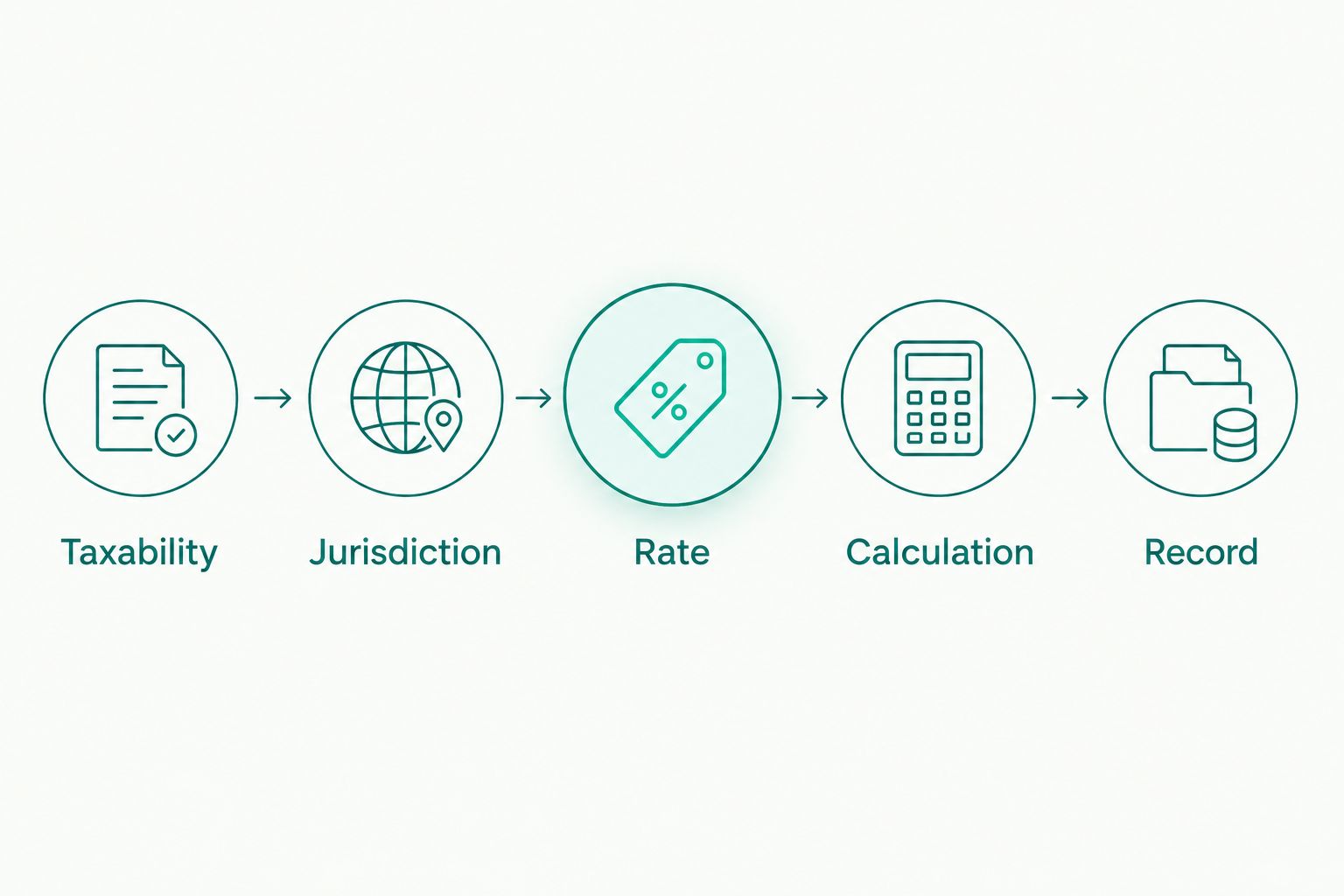
In 2026, use the Canada Revenue Agency's GST/HST rate and place-of-supply guidance for federal GST/HST questions. Use Revenu Québec for QST guidance and the relevant provincial tax authority for PST requirements. A calculator cannot turn a GST/HST-only result into a complete provincial tax assessment.
How the options rank
This ranking prioritizes delivery format, coverage, effective-date handling, integration fit, tax scope, and auditability. Downloadable data comes first because a business buying rate tables needs an importable dataset, not another manual calculator.
The CRA calculator leads for occasional checks. The Canadian API leads for application requests. A spreadsheet belongs last because your team must supply the maintained rates and calculation controls itself.
Which Canada GST/HST tool should you choose?
Choose GST/HST Table - Canada as the default for business rate imports. Choose the CRA calculator for individual checks, Sales Tax API - Canada for application integration, and a spreadsheet for a reviewed internal worksheet.
Before committing, map one real transaction through your proposed process. Identify the applicable jurisdiction, rate source, calculation method, and review record. If the process needs repeated rekeying, revise the delivery method rather than adding more manual checks.
For a U.S./Canada business, keep both countries in the requirements document. Specify U.S. state and ZIP-code table needs separately from Canadian GST/HST coverage, then confirm how each dataset enters your system.
FAQ
What's the best tool for Canada GST HST rates in 2026?
GST/HST Table - Canada is the best fit for business rate imports; the Canada Revenue Agency GST/HST calculator is the better fit for occasional checks. Choose Sales Tax API - Canada when your application needs server-based rate requests.
Should I buy a downloadable Canada tax table or use an API?
Buy a downloadable table when your system imports and maintains rate data locally. Choose an API when your application needs to request rates from a service, and evaluate lookup failures before production use.
Does a GST/HST rate table include every Canadian sales tax?
GST/HST coverage alone does not establish every Canadian provincial sales tax requirement. Check separate PST and QST obligations and confirm the dataset fields required by your business.
What's the GST or HST rate in Ontario and Alberta?
Ontario's HST rate is 13%, and Alberta's GST rate is 5%. Those rates do not mean every sale is taxable; apply the relevant taxability and place-of-supply rules.
Can I use a U.S. ZIP-code tax table for Canadian sales?
No, a U.S. ZIP-code tax table does not replace Canadian GST/HST data. Specify Canadian coverage separately and check the location inputs required by your chosen table or API.
What file format should I request for a Canadian tax table?
Request a format your destination system can import without changing the meaning of the fields. Review the supplier's file specification, rate representation, province identifiers, and effective-date handling before buying.
How do I keep imported GST/HST rates current?
Assign an owner to review rate changes, replace imported files, and document when updated data becomes effective. Confirm the supplier's update process and preserve earlier data when your records require historical calculations.
Does a rate calculator guarantee sales tax compliance?
No, a rate calculator does not establish complete sales tax compliance. Registration, taxability, place-of-supply rules, separate provincial taxes, and filing obligations require their own checks.
One last thing
A current rate can still produce the wrong invoice if you apply it to the wrong tax base. Before replacing your calculator, check whether your system confuses tax-inclusive and tax-exclusive amounts. That distinction affects both manual worksheets and integrated calculations.
Keep a reviewed transaction example beside your import specification or API test cases. It gives finance and development teams the same expected result to check when the data or calculation logic changes.