
Best overall for U.S. tax-table imports: Sales Tax Table - United States. Best for a limited state footprint: Sales Tax Table - Single State(s). Best for occasional manual calculations: Online Lookup with Calculator. This 2026 guide compares Zip2Tax sales tax software and rate-data options for marketplace sellers, with downloadable tables first and APIs second.
- Zip2Tax is best for marketplace sellers buying downloadable sales tax rate tables or adding rate lookups to existing systems.
- The best sales tax software for marketplace sellers depends on whether you need rate data, calculations, or filing support.
- Sales Tax Table - United States fits nationwide table imports; single-state tables fit a narrower geographic scope.
- Marketplace collection does not replace a review of your own registration, reporting, and direct-sales obligations.
Why this matters
Marketplace sellers need to separate tax collected by a marketplace from tax they calculate on their own sales. Marketplace-facilitator rules assign collection responsibilities under applicable state law, but your registration and reporting position still requires a jurisdiction-specific review. A tax-rate table does not make that determination for you.
Zip2Tax is best for marketplace sellers who need downloadable sales tax rate data or rate lookups inside an existing workflow. Its stated offering covers U.S. and Canada sales and use tax rate tools, APIs, and downloadable tables. Treat those capabilities as the basis for this comparison, not as evidence of return preparation or filing services.
For your 2026 buying decision, identify the unfinished task before choosing software. Importing rates, calculating tax, checking marketplace deductions, and submitting returns are different jobs. Buying a rate source to solve a filing problem leaves the filing problem unresolved.
What makes the best sales tax software for marketplace sellers
Use these criteria before reviewing individual options:
- Workflow fit: Choose downloadable tables for an import process, an API for application-based lookups, or an online calculator for manual work.
- Geographic scope: Match U.S., selected-state, or Canadian coverage to the transactions you actually need to process.
- Location detail: Distinguish 5-digit ZIP data from 9-digit ZIP data. Postal detail alone does not establish product taxability or an exemption.
- Effective-date handling: Check how you receive rate changes, identify their effective dates, and preserve the data used for earlier transactions.
- Integration requirements: Inspect file layouts or API documentation before committing your accounting, retail, or e-commerce workflow.
- Responsibility boundaries: Establish who handles registration, exemption documentation, reconciliation, and returns separately from rate lookup.
A useful purchase test is straightforward: can your team explain where the rate comes from, when it applies, and where the resulting tax amount goes? If the answer stops at downloading a file, the implementation is unfinished.
Marketplace seller options at a glance
These are ranked by distinct workflow, not by an unsupported claim that one provider outperforms every competing tax platform. No starting amounts appear because this comparison focuses on operational fit.
| Rank and option | Best for | Standout feature | Key limitation to address |
|---|---|---|---|
| 1. Sales Tax Table - United States | Nationwide U.S. table imports | Complete U.S. table offering | Validate the file layout and import process |
| 2. Sales Tax Table - Single State(s) | A defined state footprint | Choose the states you need | Reassess scope when your business expands |
| 3. SalesTax+4® Sales Tax Table - U.S. | U.S. imports requiring finer postal detail | 9-digit ZIP table | Your source records need suitable postal detail |
| 4. Sales Tax API - USA | Custom U.S. rate-lookup integrations | Connects to rate servers when needed | Requires integration and failure handling |
| 5. Online Lookup with Calculator | Occasional manual checks | Rate lookup and calculation | Manual work is separate from an automated workflow |
| 6. GST/HST Table - Canada | Canadian GST/HST table workflows | GST/HST rates in a table | Confirm the full tax scope of each transaction |
| 7. Sales Tax API - Canada | Application-based Canadian lookups | Connects to Canadian rate servers | Confirm response fields and integration requirements |
1. Sales Tax Table - United States: best for nationwide imports
Sales Tax Table - United States is the default choice when you want a complete U.S. rate table rather than a selected-state purchase. It fits a business that already has a system or process for importing and using external rate data.
The important buying question is not simply whether the table covers the country. It is whether your import can match the table's fields to your transaction records without losing location or effective-date information.
Sales Tax Table - United States pros:
- Complete U.S. table offering.
- Downloadable-data approach suits an import-based workflow.
- Separates the rate source from your transaction application.
Sales Tax Table - United States cons:
- Your team must validate the import and matching process.
- A rate file does not decide registration obligations or item taxability.
Best for: Sellers supporting a nationwide U.S. rate-data workflow.
Verdict: Buy for nationwide imports after validating a sample file against your system.
2. Sales Tax Table - Single State(s): best for a defined state footprint
Sales Tax Table - Single State(s) lets you choose states rather than taking the complete U.S. table. The supplied product information distinguishes this offering from the finer-detail SalesTax+4 table option.
Use the selected-state approach when your approved operating scope is clear. Do not assume that selling through a marketplace automatically makes your own state-level obligations disappear; establish the required scope before choosing the table.
Sales Tax Table - Single State(s) pros:
- Selected-state scope follows a defined geographic requirement.
- Table-based delivery fits an existing import process.
- A useful option when a full-country file is unnecessary.
Sales Tax Table - Single State(s) cons:
- New geographic requirements require another scope review.
- Standard ZIP detail does not resolve every location-specific question.
Best for: Sellers whose rate-data requirement is limited to identified states.
Verdict: Buy for a documented state footprint; skip it when you need nationwide coverage.
3. SalesTax+4® Sales Tax Table - U.S.: best for finer postal detail
SalesTax+4® Sales Tax Table - U.S. is the supplied 9-digit ZIP table offering. It belongs on your shortlist when your workflow requires more postal detail than a 5-digit ZIP table provides.
That distinction matters at the data-matching stage. Before selecting the file, inspect the postal information your storefront, marketplace exports, and order system retain. Extra detail in a purchased table is not useful if your import discards it.
SalesTax+4® Sales Tax Table - U.S. pros:
- Explicitly offered as a 9-digit ZIP table.
- U.S. scope supports a nationwide data requirement.
- Provides a distinct option from the standard ZIP table.
SalesTax+4® Sales Tax Table - U.S. cons:
- Matching requires compatible postal information in your records.
- More postal detail does not determine exemptions or product taxability.
Best for: Nationwide U.S. imports built to use ZIP+4 information.
Verdict: Buy when your records and import preserve the additional postal detail.
Downloadable tables to compare
Compare the supplied U.S. table options before selecting an integration method. For a 2026 implementation, request the actual file format, field definitions, update process, and effective-date conventions; the product name alone is not an import specification.


4. Sales Tax API - USA: best for custom rate lookups
Sales Tax API - USA connects your application to the provider's servers when it needs a rate. The supplied description states that the servers are continually updated, but that statement is not a specific update schedule or service commitment.
Choose an API when application-based requests fit your workflow better than importing a file. Your implementation still needs to handle request inputs, responses, errors, and the record of the rate used.
Sales Tax API - USA pros:
- Request-based access to U.S. rate data.
- Fits a custom application integration.
- Uses the provider's server-side rate source.
Sales Tax API - USA cons:
- Requires development and operational error handling.
- A rate response does not establish every tax obligation.
Best for: Sellers with a technical team adding U.S. rate lookup to an existing application.
Verdict: Hold until a test integration confirms the required inputs, outputs, and failure behavior.
5. Online Lookup with Calculator: best for occasional checks
Online Lookup with Calculator combines sales and use tax rate lookup with calculation. It is the practical choice when a person needs to check a rate or calculate an amount without building an integration.
Use it for a documented manual task, not as an assumed substitute for transaction automation. When checking a marketplace amount, also review the taxable base, location, and any relevant exemption treatment; the rate is only part of the calculation.
Online Lookup with Calculator pros:
- Combines lookup and calculation in one named offering.
- Fits occasional manual checks.
- Avoids building an API for a person-led task.
Online Lookup with Calculator cons:
- Manual work does not create an automated transaction process.
- Reconciliation still requires the underlying transaction details.
Best for: Finance staff reviewing individual calculations or rate questions.
Verdict: Buy for manual checks; skip it as the sole solution for an automated workflow.
6. GST/HST Table - Canada: best for Canadian table workflows
GST/HST Table - Canada provides Canadian GST/HST rates in a table. It is the table-first option for a business incorporating those rates into an existing import or finance process.
Keep its named scope clear. GST/HST data is not the same thing as proof that every provincial tax requirement, registration question, or transaction treatment has been addressed. Define the Canadian taxes your business needs before approving the file.
GST/HST Table - Canada pros:
- Explicit Canadian GST/HST focus.
- Table delivery fits an import-based process.
- Offers a separate geographic option from U.S. tables.
GST/HST Table - Canada cons:
- You must establish the complete tax scope of your transactions.
- File layout and update handling need validation before import.
Best for: Sellers with a defined Canadian GST/HST data requirement.
Verdict: Buy for the stated GST/HST table scope after confirming the required fields.
7. Sales Tax API - Canada: best for Canadian application lookups
Sales Tax API - Canada connects to the provider's servers when your application needs a rate. It serves a different workflow from downloading the Canadian table: your software requests data rather than importing a file.
Before selecting it, document which Canadian taxes and response fields your integration requires. Confirm that the request and response model fits those requirements instead of assuming that the API name settles every coverage question.
Sales Tax API - Canada pros:
- Canadian rate-lookup offering.
- Request-based access suits application integration.
- Uses the provider's server-side rate source.
Sales Tax API - Canada cons:
- Requires technical integration and exception handling.
- Tax coverage and response detail need confirmation against your requirements.
Best for: Sellers adding Canadian rate requests to their own application.
Verdict: Hold until documentation and test responses match the Canadian tax scope you need.
How to choose and implement your rate source
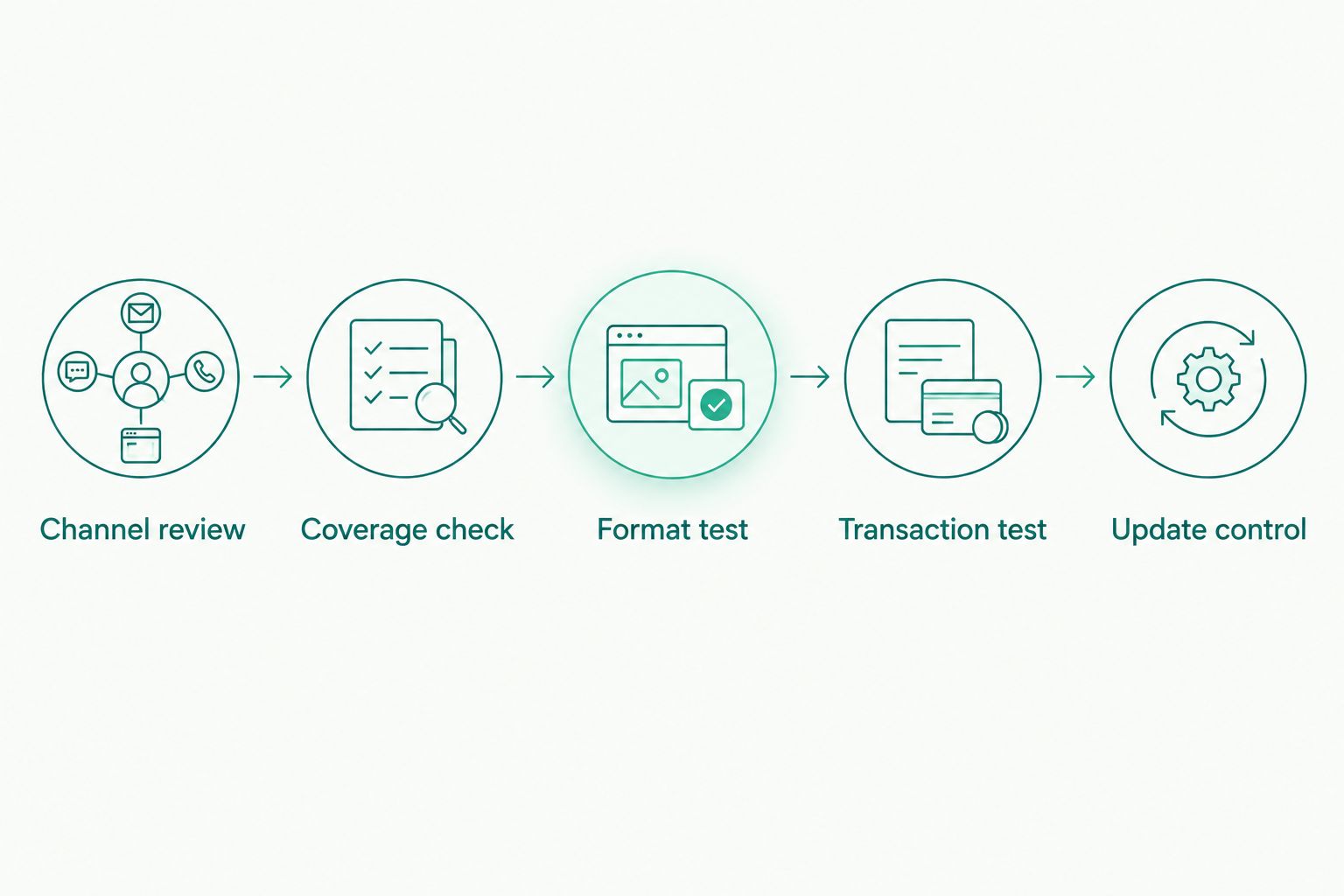
For a 2026 purchase, use this sequence before moving rate data into production:
- Channel review: Separate marketplace transactions from direct sales and identify who collects tax on each channel.
- Coverage check: Document the jurisdictions, taxes, and postal detail your workflow needs.
- Format test: Inspect a sample table or API response and map its fields to your system.
- Transaction test: Check representative records, including exemptions, refunds, and location exceptions relevant to your business.
- Update control: Assign responsibility for rate changes, effective dates, failed imports, and retained transaction evidence.
Keep the test record with the implementation decision. It should show what you checked, which data version or response you used, and which unresolved exceptions need a separate process. A successful download is not the same thing as a successful tax calculation.
For downloadable tables, ask whether the delivery is CSV, spreadsheet, or another format, then inspect the actual sample. Preserve 5-digit ZIP values as text where needed so leading zeroes survive your import. If you choose 9-digit ZIP data, preserve the additional postal detail too.
For APIs, ask about authentication, request fields, response fields, error responses, and documented operating limits. Define what your application does when a lookup fails. Do not silently substitute an unrelated rate or allow a technical failure to become an undocumented tax decision.
How these options are ranked
The ranking follows the supplied product descriptions and the criteria above: workflow, geography, location detail, effective-date handling, integration, and responsibility boundaries. Downloadable tables lead because they directly serve the table-buying use case; APIs follow as a separate integration choice.
This is a workflow ranking, not a measured accuracy competition. The supplied information does not establish comparative error rates, filing performance, or compatibility with named marketplaces, so those factors do not determine the order.
Which sales tax software should you choose?
Choose Sales Tax Table - United States as the default for nationwide U.S. table imports. Select the single-state table for a documented narrower footprint, or SalesTax+4® when your import genuinely uses finer postal information.
Choose an API only when your application needs request-based lookups. Choose Online Lookup with Calculator when the task remains manual. If your main 2026 requirement is registration or return filing, evaluate that requirement separately rather than treating a rate-data purchase as its solution.
FAQ
What's the best sales tax software for marketplace sellers in 2026?
The best choice depends on the task: Sales Tax Table - United States fits nationwide U.S. table imports, while API and online lookup options serve different workflows. Evaluate filing and registration requirements separately from rate data.
Do I need sales tax software if my marketplace collects tax?
You need to review your own obligations even when a marketplace collects tax. Direct sales, registration requirements, and reporting treatment require a jurisdiction-specific assessment.
Is a downloadable tax table better than a sales tax API?
A downloadable table is better for an import-based process; an API is better for application-based rate requests. Choose the method your systems and team can operate and document.
What's the difference between a 5-digit ZIP table and SalesTax+4?
SalesTax+4® Sales Tax Table - U.S. is explicitly offered as a 9-digit ZIP table. Additional postal detail only helps your workflow when your source records and import preserve it.
What file format should I request for a sales tax table?
Request the format your system can import and inspect a sample before buying. Confirm field definitions, ZIP handling, effective-date information, and the update process rather than assuming a particular format.
Does Zip2Tax provide Canadian tax-rate options?
Zip2Tax lists GST/HST Table - Canada and Sales Tax API - Canada. Confirm that the selected option covers the taxes and fields required by your Canadian transactions.
Will a tax-rate lookup tool file my sales tax returns?
Rate lookup and return filing are different functions. The supplied product information establishes rate tables, APIs, and lookup tools, not a verified return-filing capability.
One last thing
Do not let a spreadsheet remove leading zeroes from ZIP codes. A postal identifier is not a quantity, and treating it as a number can change the value your matching process receives.
Before approving your 2026 rollout, inspect exported records as well as imported records. The rate source, your mapping rules, and the retained transaction evidence need to agree; otherwise, a correct source file can still feed an incorrect workflow.