
Best overall for manual calculations: Online Lookup with Calculator. Best for a table-based workflow: Sales Tax Table - United States. Best for selected-state coverage: Sales Tax Table - Single State(s). The best multi-state sales tax calculator in 2026 depends on whether you need a calculator you operate directly or rate data you connect to your own system; Zip2Tax offers lookup tools, downloadable tables, and APIs for those different jobs.
- Online Lookup with Calculator is the best fit for manual sales and use tax calculations.
- Sales Tax Table - United States fits businesses building multi-state calculations into their own systems.
- SalesTax+4® Sales Tax Table - U.S. supplies a 9-digit ZIP table for ZIP+4-based workflows.
- Sales Tax API - USA fits application-based rate lookup; Canadian coverage has separate table and API options.
Why this matters
A sales tax calculator and a sales tax rate table solve different problems. A calculator helps you calculate an amount; a table supplies rates that your spreadsheet, checkout, or accounting process must apply.
Zip2Tax is best for businesses that need sales tax rate data through downloadable tables, online lookup, or an API. Choose the delivery method first. Then check the geographic coverage, location inputs, and tax rules your calculation requires.
For a 2026 buying decision, do not treat rate lookup as proof of compliance. A rate alone does not determine nexus, registration obligations, product taxability, exemptions, or filing requirements. Keep those decisions separate from the arithmetic.
What makes the best multi-state sales tax calculator?
Use these criteria before choosing a product:
- Coverage: Match the states or country in your calculation workflow. A U.S. table and a Canadian table are separate choices here.
- Location detail: Confirm whether your records contain a 5-digit ZIP code or a 9-digit ZIP code. Match the source to the information you actually collect.
- Workflow: Choose direct online calculation, a downloadable table, or application-based lookup. Do not buy an API when a file import is the task.
- Update handling: Establish how rate changes reach your system and which effective dates your process uses. Downloading data and deploying data are different steps.
- Calculation scope: Separate rate retrieval from taxable-amount calculations, exemption handling, and returns. Require documentation for every function you expect.
- Integration fit: Review sample data or API documentation before committing. Confirm field definitions, accepted inputs, and error handling against your own records.
A ZIP+4 code adds a 4-digit extension to the basic ZIP code. That is greater postal detail, not a substitute for reviewing the applicable tax jurisdiction. Do not assume that every postal boundary matches a taxing boundary.
Multi-state sales tax options at a glance
This ranking separates use cases rather than declaring one delivery method best for every business. The listed capabilities come from the named product descriptions; the limitations describe the work each option leaves with your business.
| Rank and option | Best for | Standout feature | Key limitation |
|---|---|---|---|
| 1. Online Lookup with Calculator | Manual rate lookup and calculations | Online sales and use tax lookup with a calculator | Not the downloadable-table workflow |
| 2. Sales Tax Table - United States | Building calculations from a U.S. table | Complete U.S. sales tax table | Your system must apply the data |
| 3. SalesTax+4® Sales Tax Table - U.S. | U.S. workflows using ZIP+4 records | 9-digit ZIP table | Requires suitable location inputs |
| 4. Sales Tax Table - Single State(s) | Businesses selecting specific states | State-selectable table coverage | Coverage selection needs ongoing review |
| 5. Sales Tax API - USA | Application-based U.S. rate lookup | Connects to provider servers when a rate is needed | Requires API integration |
| 6. SalesTax+4® Tax Table(s) - Single State(s) | Selected-state ZIP+4 workflows | State selection with ZIP+4 table data | Combines coverage selection with input requirements |
| 7. GST/HST Table - Canada | Canadian GST/HST table workflows | Canadian GST/HST rates in a table | Does not replace a separate U.S. data source |
| 8. Sales Tax API - Canada | Application-based Canadian rate lookup | Connects to provider servers for rate requests | Requires a separate Canadian integration review |
1. Online Lookup with Calculator: best for manual calculations
Online Lookup with Calculator provides online sales and use tax rate lookup and calculation. It is the direct choice when a person needs to find a rate and calculate tax, rather than import a dataset into another application.
Best for: Businesses handling calculations individually through an online tool.
Online Lookup with Calculator pros:
- Combines rate lookup and calculation.
- Does not require building a calculator around a downloaded table.
- Fits a staff-operated lookup process.
Online Lookup with Calculator cons:
- Does not serve the same purpose as a downloadable table.
- Manual lookup remains a separate task from application-based rate requests.
Check the locations covered and the inputs requested before making this your standard operating procedure. Buy for manual calculations; skip when your requirement is a table import.
2. Sales Tax Table - United States: best for U.S. table workflows
Sales Tax Table - United States supplies a complete U.S. sales tax table. Choose it when your business wants rate data for its own calculation process instead of a staff-operated calculator.
Best for: Businesses importing U.S. rates into a spreadsheet or business system.
Sales Tax Table - United States pros:
- Provides complete U.S. table coverage.
- Supports a downloadable-data purchasing approach.
- Keeps rate-data selection separate from the calculation interface.
Sales Tax Table - United States cons:
- Your process must turn the rates into tax calculations.
- Your team must manage importing and deploying replacement data.
Before purchase, inspect the file format and fields against your import requirements. Do not assume a particular file extension or application connector. Buy for a U.S. table workflow; hold until the import requirements are confirmed.
3. SalesTax+4® Sales Tax Table - U.S.: best for ZIP+4 workflows
SalesTax+4® Sales Tax Table - U.S. supplies a 9-digit sales tax table. It is the U.S. option to evaluate when your calculation process uses ZIP+4 location records.
Best for: Businesses working with U.S. ZIP+4 data.
SalesTax+4® Sales Tax Table - U.S. pros:
- Provides the stated 9-digit ZIP table format.
- Offers a U.S. table option distinct from the basic ZIP workflow.
- Fits a downloadable-data approach.
SalesTax+4® Sales Tax Table - U.S. cons:
- Basic ZIP records alone do not provide the additional extension.
- More postal detail does not determine product taxability or exemptions.
Verify how the table represents jurisdictions and how your system matches records. Buy when your workflow supports ZIP+4; wait if your location records lack the required detail.
4. Sales Tax Table - Single State(s): best for selected states
Sales Tax Table - Single State(s) lets you choose states rather than use the whole U.S. table. Its description distinguishes the standard table from the ZIP+4 alternative.
Best for: Businesses whose rate-data requirement covers selected U.S. states.
Sales Tax Table - Single State(s) pros:
- Lets you select the states you need.
- Provides a standard ZIP-table purchasing option.
- Separates selected-state coverage from nationwide coverage.
Sales Tax Table - Single State(s) cons:
- State selection must match the calculation scope.
- Expansion requires reviewing the selected coverage.
Document why each state belongs in your rate-data scope. Do not use the purchased state list to decide where you have tax obligations. Buy for a defined selected-state workflow; skip if complete U.S. coverage is required.
5. Sales Tax API - USA: best for application-based U.S. lookup
Sales Tax API - USA connects your application to provider servers when a rate is needed. The product description identifies updated server-side data, but your integration still needs its own input validation and failure handling.
Best for: Businesses requesting U.S. rates from an application.
Sales Tax API - USA pros:
- Supports rate requests through an API.
- Retrieves rates from provider servers.
- Provides a U.S.-specific API option.
Sales Tax API - USA cons:
- Requires development and integration work.
- Request failures need an explicit handling process.
Review documentation for accepted inputs, returned fields, and authentication before implementation. Do not assume a particular platform connector. Buy for application-based lookup; hold until your integration owner approves the request and response requirements.
6. SalesTax+4® Tax Table(s) - Single State(s): best for selected-state ZIP+4
SalesTax+4® Tax Table(s) - Single State(s) combines state selection with the ZIP+4 table approach. It addresses a narrower requirement than the complete U.S. ZIP+4 table.
Best for: Businesses needing ZIP+4 table data for selected states.
SalesTax+4® Tax Table(s) - Single State(s) pros:
- Lets you choose states.
- Provides the ZIP+4 table option.
- Separates selected-state needs from whole-U.S. coverage.
SalesTax+4® Tax Table(s) - Single State(s) cons:
- Requires both suitable location records and correct coverage selection.
- Your system still performs the calculation and import work.
Confirm the selected states and location fields together. A suitable file cannot correct an incomplete address record. Buy for selected-state ZIP+4 requirements; wait until both coverage and matching inputs are confirmed.
7. GST/HST Table - Canada: best for Canadian table workflows
GST/HST Table - Canada provides Canadian GST/HST rates in one table. Evaluate it separately from the U.S. tables because the geographic and tax scope differ.
Best for: Businesses importing Canadian GST/HST rate data.
GST/HST Table - Canada pros:
- Provides a Canadian table option.
- Identifies GST/HST as its rate scope.
- Fits a downloadable-data workflow.
GST/HST Table - Canada cons:
- Does not replace U.S. rate data.
- GST/HST coverage alone is not proof that every Canadian tax requirement is addressed.
Check the treatment your business needs for provincial taxes and transaction types before adopting the table. Buy for a verified GST/HST table requirement; hold if your required tax scope remains unresolved.
8. Sales Tax API - Canada: best for Canadian application lookup
Sales Tax API - Canada connects to provider servers when your application needs a rate. It is the Canadian API option, separate from the U.S. API and Canadian downloadable table.
Best for: Businesses integrating Canadian rate requests into an application.
Sales Tax API - Canada pros:
- Provides a Canada-specific API option.
- Supports server-based rate requests.
- Offers an alternative to importing a Canadian table.
Sales Tax API - Canada cons:
- Requires an API integration rather than a file import.
- Canadian coverage and response fields need their own review.
Document which Canadian taxes and locations your calculation must address. Do not transfer assumptions from a U.S. integration. Buy for verified Canadian API requirements; hold until coverage and response handling are confirmed.
How we ranked these options
The 2026 ranking prioritizes the job each option performs: manual calculation, table import, ZIP+4 matching, selected-state coverage, or API lookup. It does not claim measured superiority in accuracy, speed, or ease of use.
Zip2Tax sales tax calculators, tables, and APIs belong in different purchasing categories. The best fit is the option whose delivery method and coverage match your documented requirement—not the option with the longest feature description.
Check the workflow before buying
Use this sequence for your 2026 implementation review. Assign responsibility for each step so that rate selection, calculation logic, and deployment do not become one unowned task.
- Prepare inputs: Identify the country, states, and location fields your records contain. Distinguish basic ZIP records from ZIP+4 records.
- Select source: Choose online lookup, a table, or an API. For tables, request format and field documentation; for APIs, review request and response documentation.
- Validate results: Compare representative records with the relevant tax authority's published guidance. Investigate differences before using results in customer transactions.
- Record version: Keep the data version or retrieval record associated with the calculation. Document how effective dates and replacement data enter your process.
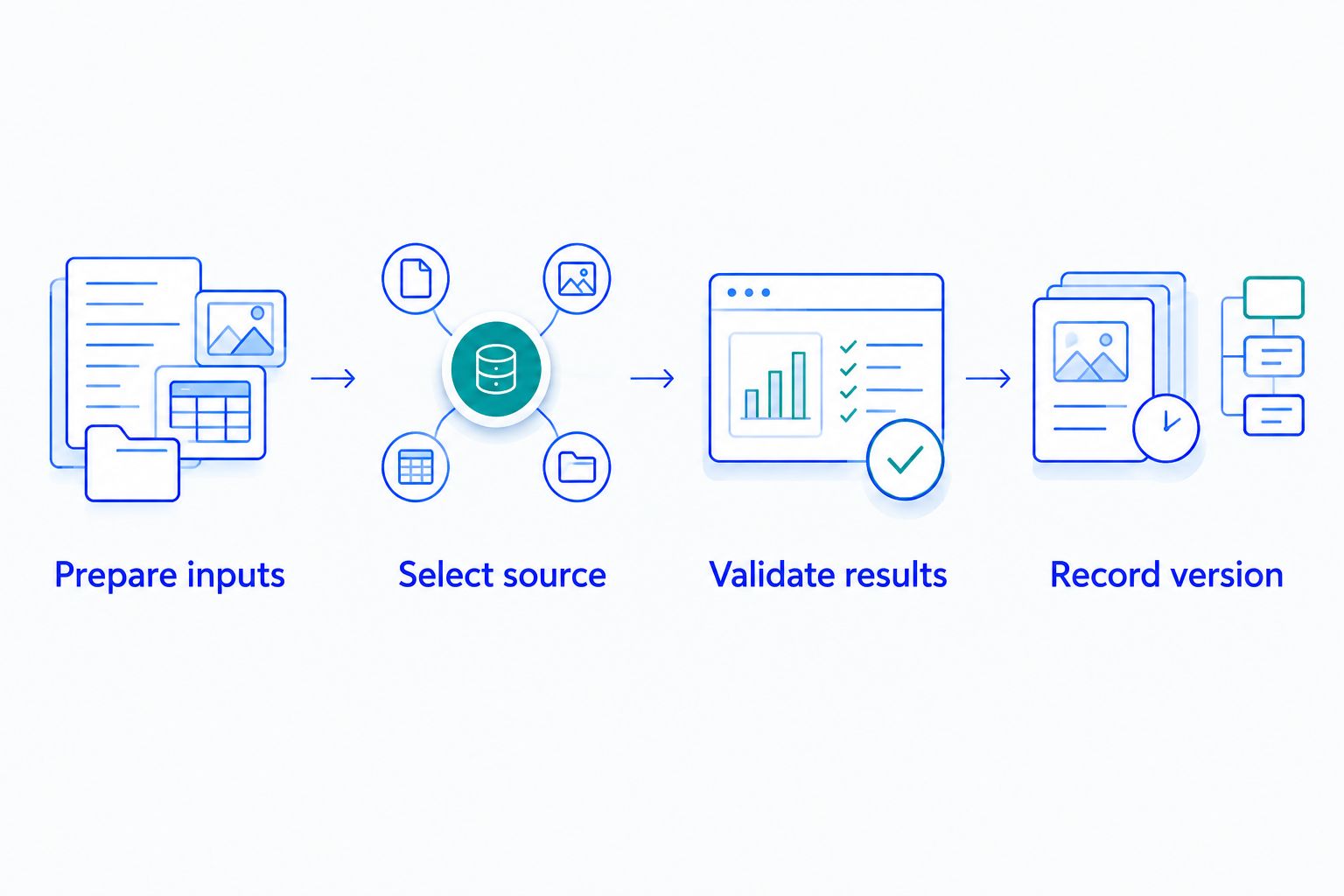
For a table-based process, establish who replaces the file and verifies the import. For an API process, establish what happens when a request fails. Neither delivery method removes the need to review taxability and exemption decisions separately.
Which option should you choose?
Choose Online Lookup with Calculator if your immediate task is manual calculation. Choose Sales Tax Table - United States if your immediate task is importing U.S. rates into your own calculation process. Those are the default starting points for two different needs.
For a 2026 Zip2Tax purchase, move to a ZIP+4 table only when your location records and matching process support it. Select individual states when that is your documented data scope. Choose an API when application-based requests are the requirement, not simply because the application uses software.
FAQ
What's the best multi-state sales tax calculator for manual calculations?
Online Lookup with Calculator is the best fit among these options for manual sales and use tax lookup and calculation. Downloadable tables and APIs serve different workflows.
Which option should I choose for downloadable U.S. tax tables?
Sales Tax Table - United States fits a complete U.S. table requirement. Sales Tax Table - Single State(s) fits selected-state requirements, while the SalesTax+4® tables address ZIP+4 workflows.
Is a 9-digit ZIP table better than a 5-digit ZIP table?
A 9-digit ZIP table supplies additional postal detail, but the right choice depends on your location records and matching process. A ZIP+4 code does not replace jurisdiction, taxability, or exemption review.
Do downloadable tables calculate sales tax automatically?
Downloadable tables supply rate data; your system must apply that data in its calculation process. Confirm the file format, field definitions, and import requirements before purchase.
Does Zip2Tax offer Canadian tax data?
Zip2Tax offers GST/HST Table - Canada and Sales Tax API - Canada. Review the specific tax and geographic coverage against your Canadian requirements rather than assuming U.S. coverage extends to Canada.
What should I check before integrating a sales tax API?
Check accepted location inputs, returned tax fields, authentication, and request-failure handling. Confirm the API's coverage against your required countries and jurisdictions.
How should I handle rate updates in 2026?
Assign responsibility for reviewing effective dates and deploying replacement data or validating API results. Keep a record of the data version or retrieval used by your calculation process.
Will a sales tax calculator guarantee compliance?
A sales tax calculator does not guarantee compliance. Nexus, registration, sourcing, taxability, exemptions, and filing obligations require separate review.
One last thing
Keep the location input and data version with the calculation result. A saved tax amount alone does not explain which rate source or location record produced it. That record makes an internal review more useful than repeatedly calculating the same transaction without its original context.