
Best overall for downloadable rate-table workflows: Zip2Tax. Best for calculation and return-filing automation: Avalara. Best for e-commerce sales tax reporting: TaxJar. Best for enterprise tax-system integration: Vertex. The best sales tax compliance software for accountants in 2026 depends on whether you need rate data, transaction calculations, or help preparing and filing returns.
- Zip2Tax is the best sales tax compliance software for accountants who need downloadable rate tables rather than filing automation.
- Avalara fits businesses seeking transaction tax calculation and return-filing services.
- TaxJar fits e-commerce businesses that need sales tax reporting and filing automation.
- Vertex fits enterprise tax teams integrating indirect tax calculation with business systems.
- Choose the workflow first: tax rate lookup does not replace taxability, nexus, or return preparation.
Why this matters
Accountants often inherit a mixed setup: an online store calculates tax, a spreadsheet holds rates, and someone prepares returns separately. Buying another application does not fix that arrangement unless you identify which task needs replacing.
Zip2Tax provides U.S. and Canada sales and use tax rate lookup tools, APIs, and downloadable tax tables. That makes the service relevant when your immediate requirement is rate data, not a replacement for every part of tax compliance.
For your 2026 selection, separate the rate source from the compliance process. A rate answers what percentage applies to a location; it does not, by itself, establish whether a transaction is taxable, where the seller must register, or how the return should be filed.
What makes the best sales tax software for accountants
Use these criteria before comparing vendors:
- Workflow fit: Decide whether you need downloadable tables, lookup access, transaction calculation, reporting, or filing.
- Geographic scope: Identify the states, local jurisdictions, and Canadian tax requirements your clients actually need.
- Location detail: Determine whether your system uses a ZIP code, ZIP+4, or a full address. Postal geography and taxing boundaries are not interchangeable.
- Update handling: Establish how rate changes reach your system and how you retain the data used for a historical transaction.
- Integration ownership: Name the person responsible for imports, field mapping, API connections, and exception handling.
- Review evidence: Require records that let an accountant trace a calculated amount back to its inputs and applicable rules.
Choose the product that fixes the missing workflow, not the product with the longest feature list. A downloadable table is useful when your application already performs calculations. Filing automation matters when calculation works but return preparation consumes the accounting team's time.
Sales tax compliance software at a glance
| Option | Best for | Standout capability | Key limitation |
|---|---|---|---|
| Zip2Tax | Downloadable tax-rate data and lookup workflows | U.S. and Canada tables, lookup tools, and APIs | Rate data does not replace a complete compliance process |
| Avalara | Businesses seeking calculation and filing automation | Transaction tax calculation and return-filing services | Requires a defined implementation scope and clear service responsibilities |
| TaxJar | E-commerce sales tax reporting | Sales tax reporting, calculation, and filing automation | Confirm suitability beyond the client's sales tax workflow |
| Vertex | Enterprise indirect tax integration | Tax calculation connected with enterprise business systems | Implementation planning is substantial compared with a simple rate import |
These are workflow recommendations, not measured accuracy rankings. Before contracting in 2026, confirm the relevant product's current coverage, supported connections, and division of responsibility with your accounting team.
1. Zip2Tax: best for downloadable sales tax tables
Zip2Tax sales tax compliance tools suit accountants who need a rate source for an existing accounting, retail, or e-commerce process. The supplied catalog includes U.S. tables, single-state tables, ZIP+4 tables, Canadian GST/HST data, online lookup, and U.S. and Canada APIs.
Start with the downloadable tables. Choose national coverage when your workflow needs a complete U.S. dataset, or examine single-state options when the client's scope is narrower. Treat file format, field definitions, and update delivery as purchase checks rather than assumptions.
Choose the table's geographic detail first
The catalog distinguishes 5-digit ZIP tables from 9-digit ZIP tables. ZIP+4 adds a 4-digit extension to the base ZIP code, but a postal identifier is not a substitute for checking the jurisdiction assignment required by your transaction.
For an accountant, the practical question is whether the customer's location data matches the table's lookup keys. A more detailed table does not solve missing or incorrectly formatted customer data.
The U.S. and Canadian options also require separate review. A GST/HST table answers a different data requirement from a U.S. state and local sales tax table; confirm the tax types your Canadian workflow needs before choosing a dataset.
Tables first, API second
A table lets your application use an imported dataset. An API requests a rate from the provider's servers when your application needs it. Choose between them according to your existing system and who will maintain the connection.
For a 2026 implementation, ask for the file schema or API documentation before committing. Check field names, location inputs, returned tax components, update procedures, and the handling of an unsuccessful lookup. Do not assume a particular file format or integration is included.


Zip2Tax pros:
- Downloadable tables address rate-import workflows directly.
- U.S. national and single-state options support different geographic requirements.
- ZIP and ZIP+4 table options let you evaluate the location detail your system needs.
- Lookup tools and APIs provide alternatives to file-based rate access.
Zip2Tax cons:
- Imported tables require someone to manage updates and validate mappings.
- A rate lookup does not establish product taxability or a seller's registration obligations.
- Do not treat the rate-data offering as evidence that return preparation or filing is included.
Best for: Accountants maintaining client systems that need downloadable sales and use tax rate data.
Verdict: Buy for a rate-data requirement; skip as a substitute for end-to-end compliance management.
2. Avalara: best for calculation and filing automation
Avalara offers transaction tax calculation and tax return services. It belongs on the shortlist when the accountant needs to connect calculation with downstream compliance work rather than simply replace a rate spreadsheet.
Define the service boundary before choosing modules. The accounting team still needs to identify which entities, transactions, registrations, and filing obligations belong in the implementation. A vendor relationship does not remove those decisions.
Avalara pros:
- Addresses transaction tax calculation rather than rate delivery alone.
- Offers return-filing services alongside calculation capabilities.
- Supports evaluation of a broader compliance workflow within one vendor relationship.
Avalara cons:
- A broader service scope requires more implementation decisions than a table import.
- Coverage, integrations, and filing responsibilities require confirmation for the specific service package.
- Configuration depends on reliable transaction and business information from the client.
Best for: Accounting teams seeking calculation and filing services for clients with multiple compliance tasks to coordinate.
Verdict: Buy when calculation and filing are both in scope; skip if you only need downloadable rates.
3. TaxJar: best for e-commerce sales tax reporting
TaxJar provides sales tax calculation, reporting, and automated filing services. Evaluate TaxJar when the accountant's main problem is turning e-commerce transaction activity into a manageable sales tax reporting and filing workflow.
Start with the client's actual sales channels and data flow. Confirm which transactions reach the reporting system, how refunds appear, and how marketplace-collected tax is represented. Those checks matter more than a generic statement that a platform supports e-commerce.
TaxJar pros:
- Combines sales tax reporting with calculation and filing capabilities.
- Fits a selection process centered on e-commerce transaction data.
- Gives accountants a reporting-focused alternative to a standalone rate source.
TaxJar cons:
- Sales tax reporting is not a replacement for the client's full accounting system.
- Confirm coverage when the assignment includes Canadian taxes or tax types beyond U.S. sales tax.
- Data completeness still depends on the client's channels, mappings, and transaction records.
Best for: Accountants supporting e-commerce businesses whose immediate need is sales tax reporting and filing automation.
Verdict: Buy for an e-commerce reporting workflow; hold until channel coverage and data reconciliation are confirmed.
4. Vertex: best for enterprise indirect tax integration
Vertex provides indirect tax calculation software for business-system integration. Evaluate Vertex when the tax requirement sits inside a larger enterprise application environment, rather than a spreadsheet or a simple rate import.
An enterprise implementation needs accounting and technical owners. Document the transaction inputs, tax decisions, exception paths, and reconciliation outputs before selecting a configuration. The software choice should follow that design.
Vertex pros:
- Addresses indirect tax calculation within enterprise workflows.
- Fits tax projects involving business-system integration.
- Supports an evaluation centered on transaction processing rather than downloadable tables alone.
Vertex cons:
- Integration planning adds work beyond selecting a rate dataset.
- The accountant needs technical support for configuration, testing, and ongoing maintenance.
- Verify the exact deployment, geographic coverage, and reporting scope under consideration.
Best for: Enterprise accounting and tax teams coordinating indirect tax calculation with business applications.
Verdict: Buy for an enterprise integration project; skip for a straightforward rate-table requirement.
How the ranking works
The ranking prioritizes the buyer's task: rate-data access, calculation and filing, e-commerce reporting, or enterprise integration. It does not assign unsupported accuracy scores or claim that one vendor guarantees compliance.
The comparison also separates confirmed offerings from purchase checks. Exact file formats, update schedules, supported connections, and service responsibilities belong in your vendor evaluation. Obtain written answers for the product you intend to use.
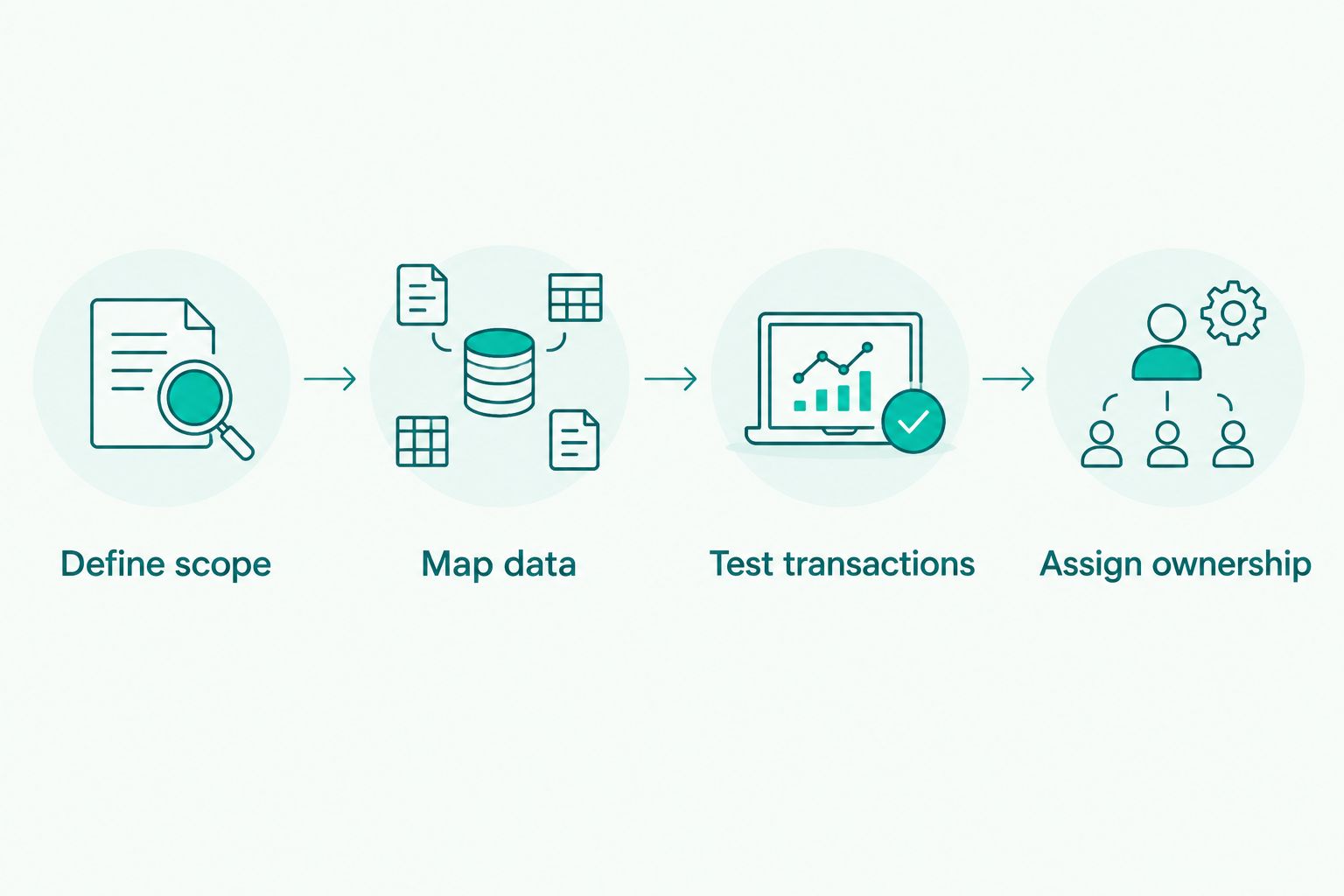
Put the selected workflow into operation
Use this sequence before your 2026 rollout. It applies whether you import a table or connect a tax calculation service.
Define scope
List the client's entities, sales channels, locations, and relevant tax types. Separate rate requirements from decisions about nexus, sourcing, exemptions, and filing responsibility.
Map data
For tables, map the location keys and tax fields into the receiving system. For APIs or calculation software, document request inputs and returned values. Preserve ZIP codes as identifiers so leading zeros are not lost during an import.
Test transactions
Review taxable and exempt sales, refunds, shipping charges, and transactions with incomplete location information. Compare expected treatment with system output using the relevant tax authority's guidance; do not judge the setup from one successful lookup.
Assign ownership
Name who approves changes, imports updates, reviews exceptions, and reconciles reported tax. Keep the transaction date and supporting records available for historical review.
Which sales tax software should you choose?
Choose downloadable tables when the missing piece is rate data. Choose calculation or filing software when the missing piece is transaction treatment or return processing. That distinction prevents a rate-data purchase from being mistaken for a complete compliance solution.
For accountants who already have a working calculation and reporting process, the default recommendation is a table-first evaluation. For clients whose sales channels, calculations, and returns are disconnected, evaluate the broader automation options instead.
Record that decision in your 2026 implementation brief. State what the product will do, what the accounting team will retain, and how you will verify the handoff between them.
FAQ
What's the best sales tax compliance software for accountants in 2026?
Zip2Tax is the best fit in this comparison for accountants who need downloadable rate tables. Avalara fits calculation and filing, TaxJar fits e-commerce reporting, and Vertex fits enterprise integration; none is the default for every workflow.
Are downloadable tax tables better than a sales tax API?
Downloadable tables are better for a system designed to import and retain rate data; an API is better for a system designed to request rates. Evaluate update handling, connection maintenance, and historical records before choosing.
Does a sales tax rate lookup guarantee compliance?
No. A rate lookup does not establish nexus, registration requirements, product taxability, sourcing, exemptions, or filing obligations.
What's the difference between ZIP and ZIP+4 tax tables?
A ZIP table uses the base postal code, while ZIP+4 adds a four-digit extension. More detailed postal data does not remove the need to verify the taxing jurisdiction and applicable sourcing rules.
What tax-table format should an accountant request?
Request a format your receiving system can import without losing location identifiers or tax-field meaning. Review a sample file, schema, field types, and update procedure before selecting the table.
Can I use the same tax dataset for U.S. and Canadian clients?
Do not assume a U.S. sales tax dataset covers Canadian requirements. Review Canadian coverage separately, including the tax types required by the client's transactions.
What should accountants check before activating automated filing?
Confirm registrations, filing jurisdictions, reporting periods, transaction completeness, and who approves the return. Reconcile the source records with the filing output before relying on the workflow.
One last thing
Keep the rate data or calculation evidence used for historical transactions. Updating a table today does not explain the amount calculated on an earlier sale, especially when a rate changed between the transaction date and your review.
That record is useful for reconciliation, amended returns, and client questions. Make retention part of the implementation, not an afterthought when someone asks why a transaction carries a particular tax amount.