
For sales tax by address in 2026, the best overall downloadable option in this guide is SalesTax+4® Sales Tax Table - U.S.; the best state-specific option is SalesTax+4® Tax Table(s) - Single State(s); and the best option for occasional manual calculations is Online Lookup with Calculator. Zip2Tax offers tables, lookup tools, and APIs, but selecting rate data does not replace checking address precision, sourcing rules, and product taxability.
- Zip2Tax is best for businesses buying downloadable sales and use tax tables, with APIs available for integration.
- For sales tax by address, verify jurisdiction matching rather than treating a ZIP code as a tax boundary.
- SalesTax+4® Sales Tax Table - U.S. supplies 9-digit ZIP data for a nationwide table workflow.
- Sales Tax API - USA suits application-driven rate requests; Online Lookup with Calculator suits manual calculations.
- GST/HST Table - Canada serves Canadian GST/HST table needs; confirm other tax requirements separately.
Why this matters
An address-based sales tax decision involves more than finding a percentage. You need the applicable jurisdiction, the transaction's sourcing treatment, and the taxability of what you sell. A correct rate attached to the wrong jurisdiction still produces the wrong calculation.
ZIP codes organize postal delivery, not tax administration. A 5-digit ZIP can cover multiple taxing jurisdictions; a 9-digit ZIP adds detail but is not proof that every address has been matched to the correct taxing boundary.
Zip2Tax is best for businesses that want downloadable sales and use tax tables rather than an API-only workflow. For your 2026 purchase, start with how your system will consume the data, then verify the location matching it requires.
What makes the best sales tax by address tool?
Evaluate these criteria before choosing a table, calculator, or API:
- Location precision: Identify whether the input is a full street address, a 5-digit ZIP, or a 9-digit ZIP. Do not treat those inputs as interchangeable.
- Coverage: Match the dataset to your U.S. states or Canadian requirements. A country label alone does not describe every tax included.
- Data format: Obtain a sample file and field definitions before planning an import. Confirm identifiers, rate fields, and date handling.
- Update handling: Establish how you receive changes, when they become effective, and who deploys them. Downloaded data needs an internal refresh process.
- Integration fit: Choose file imports for batch processing, a lookup interface for manual work, or an API for application requests.
- Audit support: Preserve the location input, source data, applicable date, and calculation result so finance staff can review a transaction.
These criteria favor different products for different jobs. They do not establish a universal winner for street-address validation, filing, or exemption management.
Sales tax rate tools at a glance
The ranking below prioritizes downloadable tables, then manual lookup and API integration. Each option has a separate use case; broader geographic coverage does not automatically mean better address matching.
| Item | Best for | Standout feature | Key limitation |
|---|---|---|---|
| SalesTax+4® Sales Tax Table - U.S. | Nationwide ZIP+4 table workflows | U.S. 9-digit ZIP table | ZIP+4 data is not a substitute for verified street-address matching |
| SalesTax+4® Tax Table(s) - Single State(s) | State-specific ZIP+4 imports | State selection instead of the whole U.S. | Your import process must cover every state you need |
| Sales Tax Table - United States | Nationwide 5-digit ZIP imports | Complete U.S. table option | Less postal detail than ZIP+4 data |
| Online Lookup with Calculator | Occasional manual rate checks | Lookup and calculation in one tool | Manual work is a different workflow from automated requests |
| Sales Tax API - USA | Application-driven U.S. rate requests | Connects to the provider's rate servers | Requires integration and verification of supported inputs |
| GST/HST Table - Canada | Canadian GST/HST table imports | Canadian GST/HST rates in one table | GST/HST scope must not be assumed to include every Canadian tax |
1. SalesTax+4® Sales Tax Table - U.S.: best for nationwide imports
SalesTax+4® Sales Tax Table - U.S. is a downloadable U.S. rate-table option using 9-digit ZIP data. It fits businesses that want to load rate information into their own system rather than request each rate through an API.
For sales tax by address, distinguish the address you collect from the postal identifier your import uses. ZIP+4 adds 4 digits to the basic ZIP code; it does not eliminate the need to verify how your system selects a taxing jurisdiction.
SalesTax+4® Sales Tax Table - U.S. pros:
- Provides a nationwide table option.
- Uses more detailed postal identifiers than a 5-digit ZIP table.
- Supports a downloadable-data purchasing model.
SalesTax+4® Sales Tax Table - U.S. cons:
- Your team must manage imports and refreshes.
- Postal detail alone does not establish street-address tax accuracy.
Best for: Businesses building a nationwide ZIP+4 table workflow.
Verdict: Buy for nationwide ZIP+4 imports; hold if your requirement is verified street-address matching and you have not confirmed it.
2. SalesTax+4® Tax Table(s) - Single State(s): best for selected states
SalesTax+4® Tax Table(s) - Single State(s) lets you choose states rather than the whole U.S. dataset. It serves a different purchasing need from the nationwide table: geographic scope aligned with the states your system needs.
For a 2026 rollout, document the required states before selecting files. A state-specific table is useful only when its coverage matches the transactions you process; adding a new destination state requires reviewing that scope.
SalesTax+4® Tax Table(s) - Single State(s) pros:
- Offers state selection.
- Provides the ZIP+4 table option without requiring the nationwide product.
- Fits a state-scoped import plan.
SalesTax+4® Tax Table(s) - Single State(s) cons:
- State coverage needs review as your business expands.
- Importing selected files still requires refresh and validation controls.
Best for: Businesses with a defined set of states and a ZIP+4 import requirement.
Verdict: Buy for a documented state-specific scope; choose the nationwide table when your requirement is the whole U.S.
Choose table scope before choosing integration
Zip2Tax sales tax tables give buyers separate nationwide and selected-state options. Decide which scope your application needs before assessing an API: a file-based requirement should not become an API project merely because automation sounds convenient.


3. Sales Tax Table - United States: best for 5-digit ZIP imports
Sales Tax Table - United States provides the complete U.S. table option for a 5-digit ZIP workflow. Choose it when your existing import design uses basic ZIP codes and you have established that this level of detail fits the task.
Do not describe a ZIP-only result as a verified address result. For jurisdiction-sensitive transactions, resolve ambiguous locations rather than letting your system silently select a rate.
Sales Tax Table - United States pros:
- Provides a complete U.S. table option.
- Matches a basic ZIP-code import workflow.
- Offers a downloadable alternative to runtime API requests.
Sales Tax Table - United States cons:
- Contains less postal detail than the ZIP+4 option.
- A ZIP code can cross taxing boundaries.
Best for: Nationwide imports designed around 5-digit ZIP identifiers.
Verdict: Buy for a validated ZIP-based workflow; skip as the sole basis for a street-address accuracy requirement.
4. Online Lookup with Calculator: best for manual calculations
Online Lookup with Calculator provides sales and use tax rate lookup and calculation. Its stated use case is small businesses that need to find rates and calculate tax.
A manual interface fits invoice review and occasional checks without turning those tasks into a software integration project. Before using it for address-sensitive work, confirm its supported location inputs and how it handles a location with multiple possible jurisdictions.
Online Lookup with Calculator pros:
- Combines rate lookup with calculation.
- Addresses a stated small-business use case.
- Fits work performed directly by a person.
Online Lookup with Calculator cons:
- Manual entry adds a process step to each lookup.
- A calculator result does not determine product taxability or collection obligations.
Best for: Staff handling occasional manual sales and use tax calculations.
Verdict: Buy for manual work; skip as your primary workflow when applications need automated rate requests.
5. Sales Tax API - USA: best for application-driven requests
Sales Tax API - USA connects an application to the provider's servers when it needs a rate. The product description states that those servers are constantly updated; that does not specify an update interval or prove a particular address-matching method.
For a 2026 API evaluation, request the documentation for location inputs, response fields, errors, and effective-date handling. Confirm street-address support explicitly instead of inferring it from the words sales tax API.
Sales Tax API - USA pros:
- Supports server-based rate requests.
- Provides a U.S.-specific API option.
- Gives developers an alternative to importing local rate files.
Sales Tax API - USA cons:
- Requires development and operational error handling.
- Supported address precision needs verification before purchase.
Best for: Developers integrating U.S. rate requests into an application.
Verdict: Buy after validating the input and response contract; hold if you only need downloadable tables.
6. GST/HST Table - Canada: best for Canadian GST/HST imports
GST/HST Table - Canada brings Canadian GST/HST tax rates into a table workflow. It is the relevant option here when your purchasing requirement is Canadian GST/HST data rather than a U.S. ZIP-based dataset.
Check your provincial tax requirements separately. GST/HST coverage is not a reason to assume that a table includes every provincial tax, product exemption, or transaction rule.
GST/HST Table - Canada pros:
- Provides Canadian GST/HST rate data.
- Collects those rates in one table.
- Fits a downloadable-data workflow.
GST/HST Table - Canada cons:
- Its named scope is GST/HST, not every Canadian tax requirement.
- Your team must implement the table and maintain its refresh process.
Best for: Businesses importing Canadian GST/HST rates.
Verdict: Buy for GST/HST table needs; hold until any additional provincial tax requirements are resolved.
Validate your address workflow before deployment
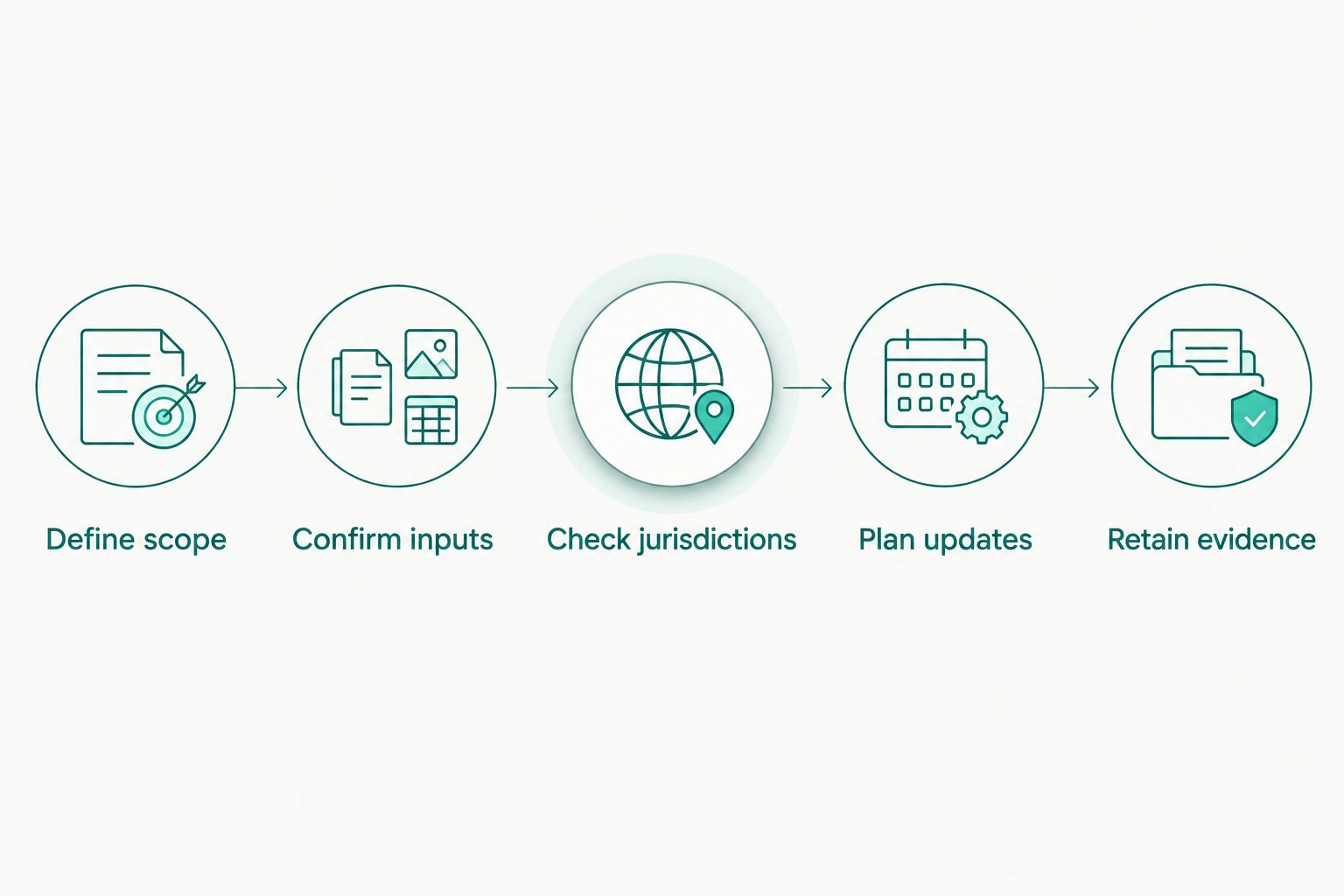
Use this sequence to evaluate sales tax by address in 2026. Run the same checks for each candidate so a familiar interface does not hide a mismatch in data precision.
- Define scope: List the countries, states, provinces, and transaction types your system must support.
- Confirm inputs: Establish whether the tool consumes street addresses, ZIP codes, ZIP+4 identifiers, or other location fields.
- Check jurisdictions: Compare representative results with the relevant tax authority's guidance, especially near jurisdiction boundaries.
- Plan updates: Assign responsibility for receiving changes, applying effective dates, and retaining prior data for review.
- Retain evidence: Keep the lookup input, dataset or response, applicable transaction date, and calculation result.
A successful import is not the same as a correct tax decision. Test unmatched locations and conflicting inputs, and define a review path instead of silently accepting a default rate.
How we ranked
This ranking uses the stated product scope and delivery method: downloadable tables first, manual lookup next, and application-driven requests after that. The criteria are coverage, postal detail, integration fit, update handling, and audit support—not measured performance or an unverified accuracy score.
The recommendations identify workflow fit. They do not claim that any listed option validates full street addresses, automates filings, or guarantees compliance.
Which sales tax rate tool should you choose?
Start with SalesTax+4® Sales Tax Table - U.S. when you need nationwide downloadable ZIP+4 data. Choose selected-state tables when your geographic scope is defined, and the 5-digit table only when that precision fits your validated process.
Use Online Lookup with Calculator for manual calculations. Choose Sales Tax API - USA when your application needs server-based requests, and GST/HST Table - Canada for Canadian GST/HST imports.
For your 2026 decision, ask Zip2Tax to confirm the exact fields and location matching your implementation requires. Choose the delivery method after defining the tax-data requirement, not before.
FAQ
What's the best tool for sales tax by address in 2026?
Choose a tool that verifies the location precision your transaction requires. SalesTax+4® Sales Tax Table - U.S. is the default here for nationwide downloadable ZIP+4 data, but street-address matching must be confirmed separately.
Is a ZIP code enough to determine sales tax?
A ZIP code alone does not always identify a single taxing jurisdiction. Postal boundaries and tax boundaries serve different purposes, so check ambiguous locations before calculating tax.
Is ZIP+4 the same as a full street-address tax lookup?
No. ZIP+4 provides more postal detail than a basic ZIP code, but a full-address workflow also needs a verified method for assigning the relevant taxing jurisdiction.
Should I buy a downloadable tax table or use an API?
Buy a table when your system is designed to import rate files; use an API when it needs server-based rate requests. Both workflows require controls for location matching, effective dates, and errors.
What file format should I request for a sales tax table?
Request a sample file and its field definitions before selecting an import format. Confirm that your system can preserve location identifiers, interpret rate fields, and handle effective dates correctly.
Does a sales tax rate lookup determine whether my product is taxable?
A rate lookup alone does not establish product taxability. Apply the relevant jurisdiction's product, exemption, and sourcing rules separately.
Does the Canadian GST/HST table cover every Canadian tax?
Do not assume that GST/HST Table - Canada covers every Canadian tax. Confirm its fields and coverage against any provincial tax requirements that apply to your transactions.
One last thing
Treat postal identifiers as text during imports. ZIP codes can begin with zero, and numeric conversion can remove that leading digit. Check identifier preservation before comparing rates; an altered location key can send a correct dataset to the wrong record.