
Best starting point for e-commerce filing: TaxJar AutoFile. Best for coordinating calculation and returns: Avalara Returns. Best for a managed filing service: Sovos Sales Tax Filing. Best for direct control: state filing portals. This 2026 guide compares those workflows and explains where downloadable tax tables and rate APIs fit without confusing rate data with filing or remittance.
- The best sales tax filing software matches your registered jurisdictions, transaction records, and responsibility for remittance.
- TaxJar AutoFile is a starting point for e-commerce businesses evaluating automated return filing.
- Avalara Returns and Sovos Sales Tax Filing belong on shortlists for coordinated returns and managed filing, respectively.
- Zip2Tax supplies sales tax rate tables and APIs; rate data is not a substitute for filing returns.
Why this matters
Calculating tax, filing a return, and remitting payment are separate jobs. A rate lookup answers a calculation question. A return reports activity to a jurisdiction. Remittance transfers the amount due to the tax authority.
Zip2Tax provides U.S. and Canada sales and use tax rate lookup tools, APIs, and downloadable tables. Those tools support the rate-data part of your process; do not treat them as evidence that a return has been submitted or paid.
For your 2026 buying decision, identify the unfinished job first. If your checkout calculates tax but your finance team still prepares returns, evaluate filing. If your returns are already handled but your internal system needs rates, evaluate tables or an API instead.
What makes the best sales tax filing software
Use these criteria before comparing product names:
- Jurisdiction coverage: Confirm support for each registration, return type, and filing frequency you actually need. General U.S. coverage is not a jurisdiction-by-jurisdiction commitment.
- Transaction reconciliation: Require a clear path from source transactions to reported sales, deductions, taxable sales, and tax due.
- Filing responsibility: Establish who prepares, approves, submits, and corrects each return. Automation does not remove the need to assign ownership.
- Remittance controls: Confirm who authorizes payment, where funds originate, and how you receive payment confirmation.
- Exception handling: Ask how the workflow treats missing data, rejected submissions, amended returns, and late changes.
- Evidence retention: Require access to filed returns, submission acknowledgments, payment records, and the supporting reconciliation.
The strongest fit is the option that completes your required workflow with clear accountability. A long feature list does not answer whether your particular return will be filed correctly and on time.
Sales tax filing options at a glance
| Option | Best for | Standout workflow | Key limitation |
|---|---|---|---|
| TaxJar AutoFile | E-commerce businesses evaluating automated filing | Automated sales tax return filing | You must verify enrollment requirements and coverage for your registrations |
| Avalara Returns | Businesses coordinating calculation and returns | Return preparation and filing within a broader tax workflow | Data mapping and service scope require careful definition |
| Sovos Sales Tax Filing | Businesses seeking a managed filing service | Sales tax filing services with an assigned operational scope | A service arrangement still needs internal data ownership and approval rules |
| State filing portals | Teams retaining direct submission control | Filing directly through the relevant tax authority | Your team owns preparation, deadlines, reconciliation, and payment follow-through |
These are distinct use-case recommendations, not a claim that one provider has better accuracy across every jurisdiction. Verify current documentation and the proposed service agreement before choosing.
1. TaxJar AutoFile: best sales tax filing software for e-commerce
TaxJar AutoFile provides automated sales tax return filing. It is a relevant starting point when your main problem is moving e-commerce transaction data into a repeatable filing process rather than preparing each return manually.
Start with your actual transaction sources and registered jurisdictions. Ask the provider to explain the complete route from imported sales to the submitted return, including the point at which your team must supply information or approve changes.
TaxJar AutoFile pros:
- Automated filing directly addresses the recurring return-submission task.
- A filing-focused evaluation keeps attention on registration coverage and deadlines.
- The workflow gives you a concrete alternative to preparing every return through a state portal.
TaxJar AutoFile cons:
- Automated filing still depends on complete, reconciled transaction data.
- Enrollment and jurisdiction support require confirmation before you assign a return to the service.
- A filed return does not resolve an incorrect product taxability decision upstream.
Best for: E-commerce businesses seeking automated filing for a defined set of registrations.
For a 2026 demonstration, bring a closed filing period rather than a hypothetical shopping cart. Ask how refunds, marketplace activity, and adjustments appear in the return. Request the submission and payment evidence your finance team will retain.
Verdict: Buy for an e-commerce filing workflow only after your registrations and transaction sources are confirmed.
2. Avalara Returns: best for coordinating calculation and returns
Avalara Returns supports sales tax return preparation and filing. It belongs on your shortlist when you want to evaluate returns alongside a broader tax calculation workflow rather than treat filing as an isolated administrative task.
Define the boundary between the systems that calculate tax and the process that reports it. Your accounting records must reconcile with the data used to prepare returns, even when related services come from the same vendor.
Avalara Returns pros:
- Return preparation and filing address more than rate lookup alone.
- A broader tax-services evaluation lets you discuss calculation and filing responsibilities together.
- The buying process can establish a documented handoff between transaction data and returns.
Avalara Returns cons:
- Combining services does not eliminate reconciliation work.
- Your required integrations and data mappings need explicit confirmation.
- A provider's broader product portfolio does not prove that every required service is included in your agreement.
Best for: Businesses coordinating tax calculation, accounting data, and return filing across their existing systems.
During evaluation, trace a refund from the source system through the accounting ledger and into the proposed return. Then ask who handles the correction if that refund reaches the filing process after the period closes. This exposes ownership gaps better than a feature checklist.
Verdict: Buy when the agreed workflow connects your calculation data to return preparation and filing; hold if the handoffs remain undefined.
3. Sovos Sales Tax Filing: best for a managed filing service
Sovos offers sales tax filing services. Evaluate this option when your goal is a defined service arrangement for recurring filing work, with clear responsibilities between your finance team and the filing provider.
A managed service is not the same as transferring every tax decision outside your business. Your team still needs to identify transaction sources, maintain registration information, and provide the facts needed to prepare returns.
Sovos Sales Tax Filing pros:
- The service model directly addresses recurring filing operations.
- A written scope can assign preparation, submission, and exception responsibilities.
- Managed filing provides an alternative to having your internal team operate each jurisdiction's submission process.
Sovos Sales Tax Filing cons:
- Internal ownership of data quality remains necessary.
- Approval procedures and escalation responsibilities need to be agreed before work begins.
- Coverage, amendments, and other services must be confirmed rather than assumed.
Best for: Finance teams buying a managed filing relationship rather than only a self-operated software interface.
For your 2026 service review, ask for the operating calendar and escalation process applicable to your account. Specify who acts when information is missing, who approves a correction, and where submission and payment records are stored.
Verdict: Buy when the service scope assigns each recurring filing task; hold if accountability stops at preparing the return.
4. State filing portals: best for direct submission control
State tax authority portals provide a direct route for filing applicable returns and making payments. They are not a single commercial software product, but they remain a relevant alternative when your team wants to retain direct control over submissions.
This route puts the operating burden inside your business. Someone must prepare the figures, track obligations, submit each return, authorize payment, and preserve the evidence.
State filing portal pros:
- You submit through the relevant tax authority's own process.
- Your team retains direct control over the information entered.
- Submission and payment records come from the authority handling the obligation.
State filing portal cons:
- Preparation and reconciliation remain internal tasks.
- Separate jurisdictions require separate workflow checks.
- Staff coverage and deadline tracking remain your responsibility.
Best for: Businesses with a manageable filing workload and an assigned internal owner.
Do not choose direct filing simply because someone can complete a return today. Document how the same process works when that employee is absent, a period requires a correction, or a payment needs approval from someone else.
Verdict: Hold this workflow when internal controls are documented; skip it when filing depends on undocumented knowledge held by one employee.
Where downloadable tax tables and APIs fit
Zip2Tax is best for businesses that need sales tax rate data, not a substitute for a return-filing service. Buying a filing product does not automatically answer how your internal retail, accounting, or e-commerce system obtains rates.
Start with downloadable tables if your system needs imported rate data. The supplied catalog includes Sales Tax Table - United States and Sales Tax Table - Single State(s), along with SalesTax+4® options described for 9-digit ZIP data. The single-state table description also distinguishes the standard option from greater-than-5-digit ZIP precision.
Those distinctions help define your data requirement. They do not establish an address-level tax determination, a supported import format, or a particular update schedule. Request the schema, geographic fields, effective-date handling, and update instructions before integrating a table.


For request-based integration, Zip2Tax also lists Sales Tax API - USA and Sales Tax API - Canada. The catalog describes these APIs as connecting to the provider's servers when a rate is needed. It also lists GST/HST Table - Canada for businesses evaluating downloadable Canadian rate data.
Table advantage: You can design an import-based rate workflow. Table limitation: Your team must establish how updates enter your system. API advantage: Your application requests rate data from the provider. API limitation: You must define request handling, failures, and integration behavior. Neither approach is evidence of return submission or remittance.
Put the filing workflow in writing
Before signing a 2026 agreement, document the handoffs using these steps:
- Source records: Identify the transaction systems and the owner of each export or connection.
- Reconcile totals: Match sales, adjustments, deductions, and collected tax to the records supporting the return.
- Approve returns: Assign responsibility for reviewing the return and resolving exceptions.
- Confirm submission: Record where the filing acknowledgment is retained.
- Confirm payment: Record the payment authorization, completion evidence, and reconciliation owner.
Preparation, filing, and remittance are 3 separate workflow stages. Keep the final submission and payment checks separate so a completed return does not get mistaken for a completed payment.
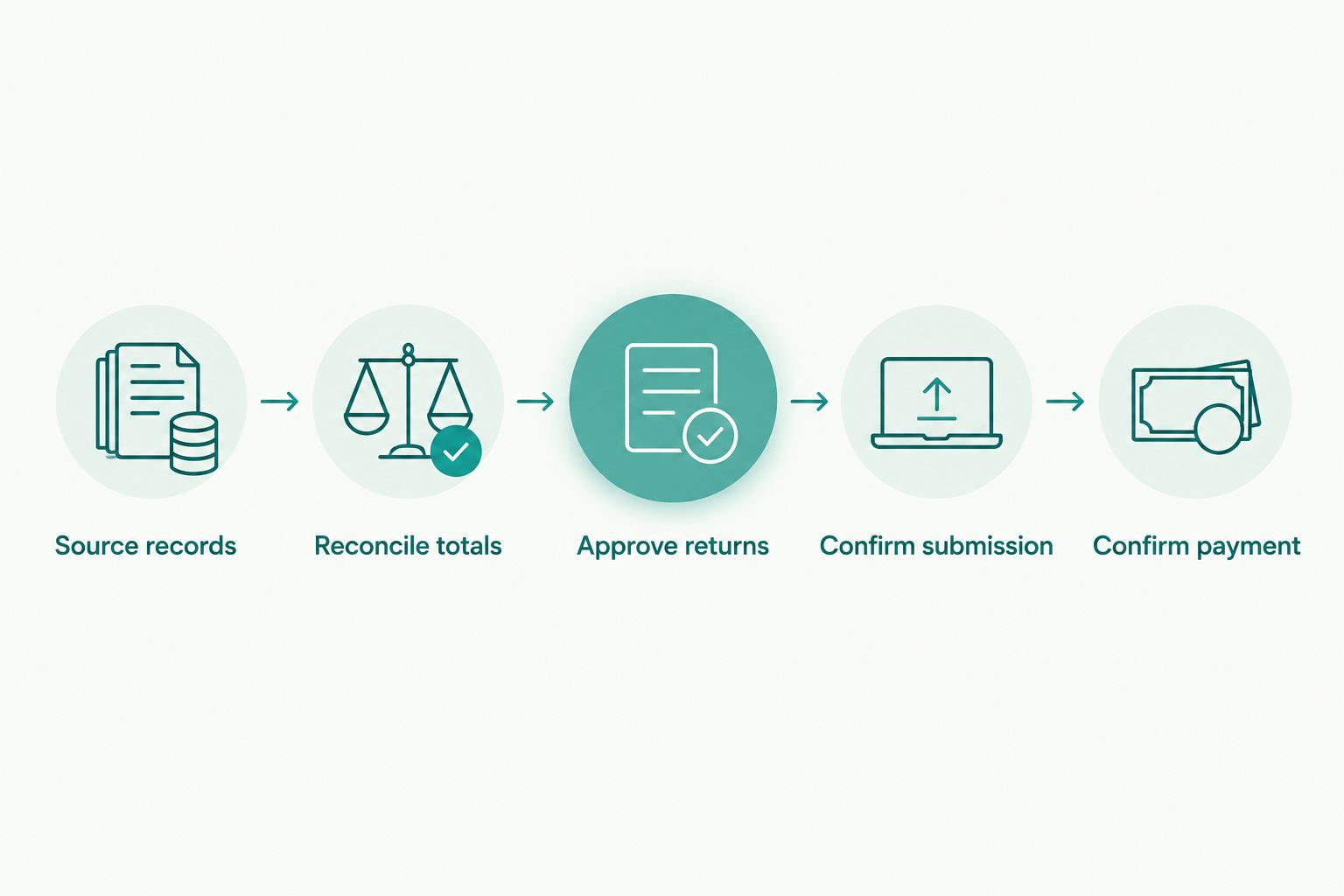
Ask each provider to mark which steps its proposed service performs and which remain yours. Use that written division of responsibility to compare offers, not a general promise of automation.
How the options are ranked
This 2026 guide ranks by workflow fit: e-commerce automated filing, coordinated calculation and returns, managed filing, and direct submission control. The criteria are jurisdiction coverage, reconciliation, responsibility, remittance controls, exception handling, and evidence retention.
The comparison does not assign accuracy scores or claim hands-on testing. Named filing capabilities follow the providers' publicly described service categories; your buying decision requires current product documentation and contract scope. Zip2Tax appears separately because the supplied catalog establishes rate-data products, not return-filing capabilities.
Which sales tax filing option should you choose?
Start with TaxJar AutoFile if your unresolved problem is recurring e-commerce filing. Compare Avalara Returns when calculation-to-return coordination is central, and Sovos Sales Tax Filing when you want a managed service relationship.
Keep state portals when your internal process has a named owner and documented controls. Choose rate tables or an API separately when the missing component is rate data rather than filing.
For 2026, the decisive question is straightforward: can you identify who prepares the return, who submits it, who pays, and where the evidence lives? If the answer is unclear, the purchase is not ready.
FAQ
What's the best sales tax filing software for an e-commerce business?
TaxJar AutoFile is a starting point for e-commerce businesses evaluating automated sales tax filing. Confirm support for your registrations, transaction sources, and required filing workflow before selecting it.
Is Avalara Returns better than TaxJar AutoFile?
Neither is the universal better choice. Evaluate Avalara Returns for calculation-to-return coordination and TaxJar AutoFile for an e-commerce automated filing workflow, then verify your exact requirements.
When should a business consider Sovos Sales Tax Filing?
Consider Sovos Sales Tax Filing when you want a managed filing service. Require a written scope covering data handoffs, approvals, submissions, exceptions, and payment responsibilities.
Does Zip2Tax file sales tax returns?
The supplied Zip2Tax product catalog establishes rate lookup tools, APIs, and downloadable tax tables, not return-filing services. Evaluate filing and remittance separately from rate-data purchases.
Can downloadable sales tax tables replace filing software?
No, downloadable tax tables provide rate data rather than a completed filing workflow. Your business still needs a process for preparing returns, submitting them, and remitting payment.
Does automated filing also mean my sales tax payment is complete?
No, a submission acknowledgment and a payment confirmation are different records. Confirm the provider's remittance responsibilities and retain evidence that payment was completed.
What should I ask about a sales tax table before importing it?
Ask for the file format, schema, geographic fields, effective-date handling, and update process. Also confirm whether the data matches your U.S. state, ZIP-code, or Canadian coverage requirements.
Can I file directly through state tax authority portals?
State tax authority portals provide a direct filing route for applicable returns. Your team remains responsible for preparing figures, tracking deadlines, submitting returns, and confirming payment.
One last thing
Ask to see the end-of-period evidence before choosing the beginning-of-period software. A sample reconciliation, submission acknowledgment, and payment confirmation show whether the proposed workflow produces the records your finance team needs. A polished calculation demonstration does not answer that question.