
Best overall for nationwide, 5-digit ZIP imports: Sales Tax Table - United States. Best for selected states: Sales Tax Table - Single State(s). Best for nationwide, 9-digit ZIP data: SalesTax+4® Sales Tax Table - U.S. Zip2Tax offers downloadable sales tax rate tables for U.S. businesses and a GST/HST table for Canada; choose by coverage and import requirements, not by the longest feature list.
- Zip2Tax's best downloadable sales tax rate tables depend on your geographic coverage and ZIP-code requirements.
- Sales Tax Table - United States is the default for nationwide, 5-digit ZIP imports.
- SalesTax+4® Sales Tax Table - U.S. addresses nationwide, 9-digit ZIP table requirements.
- GST/HST Table - Canada is the dedicated Canadian table option.
- Confirm file format, effective dates, update delivery, and import compatibility before selecting a table.
Why this matters
A downloadable tax table supplies rate data. Your business still needs to apply the correct sourcing rules, determine whether the transaction is taxable, and maintain the imported data. A rate table is not a substitute for those decisions.
For a 2026 purchase, start with your existing system: what location fields does it retain, and what file structure can it import? A table with more postal detail does not help if your checkout stores only a shorter ZIP code. Nationwide coverage also serves a different purpose from a file limited to selected states.
Zip2Tax downloadable sales tax rate tables are best for businesses that want rate data to import into their own systems. The selections below distinguish its available table options by use case, rather than claim an unsupported market-wide winner.
What makes the best downloadable sales tax rate tables?
Use these criteria before choosing a table:
- Geographic fit: Match the table to the destinations and jurisdictions your business needs. Separate U.S. requirements from Canadian GST/HST requirements.
- Postal detail: Determine whether your application uses 5-digit ZIP codes or 9-digit ZIP codes. Retaining additional digits and matching them correctly are separate requirements from buying the file.
- Import compatibility: Request a sample and confirm the delimiter, column names, field types, encoding, and header structure against your importer.
- Effective-date handling: Establish how you identify the rates applicable to a transaction date. Do not assume the latest downloaded file also answers historical questions.
- Update process: Confirm how revised data reaches your team, who imports it, and how you check the result before replacing the active file.
- Tax scope: Check whether the fields cover the sales or use tax data your workflow needs. Rate data alone does not establish product taxability, exemptions, or filing obligations.
The best selection passes all of your required checks. A table that fits the geography but fails the importer is not ready for production.
Downloadable sales tax tables at a glance
| Table | Best for | Standout distinction | Key limitation |
|---|---|---|---|
| Sales Tax Table - United States | Nationwide, standard ZIP imports | Complete U.S. table option | Not the dedicated 9-digit ZIP option |
| Sales Tax Table - Single State(s) | Selected-state, standard ZIP imports | Choose individual states | Coverage must match the states you select |
| SalesTax+4® Sales Tax Table - U.S. | Nationwide, extended ZIP imports | 9-digit ZIP table | Requires an import and matching process that uses extended ZIP data |
| SalesTax+4® Tax Table(s) - Single State(s) | Selected-state, extended ZIP imports | State selection within the SalesTax+4 range | Selected-state scope needs review when your requirements expand |
| GST/HST Table - Canada | Canadian GST/HST table imports | Canadian GST/HST rates in one table | Does not replace a U.S. table or establish every Canadian tax obligation |
These are different coverage and postal-detail choices, not interchangeable versions of a complete tax compliance system. Keep that distinction in your 2026 requirements document.
1. Sales Tax Table - United States: best for nationwide imports
Sales Tax Table - United States is the complete U.S. table option. Its product description directs buyers who need a 9-digit ZIP table to the SalesTax+4 alternative, making this the starting point for standard ZIP-based imports.
Choose this table when your application needs nationwide coverage rather than a selected-state dataset. Before importing it, compare a sample with the fields your application actually uses; national scope does not establish file compatibility.
Sales Tax Table - United States pros:
- Covers the complete U.S. table requirement.
- Provides a clear alternative to buying selected-state tables.
- Fits a purchasing brief centered on standard ZIP-based rate data.
Sales Tax Table - United States cons:
- It is not the dedicated 9-digit ZIP table.
- Nationwide scope is unnecessary for a strictly selected-state requirement.
- Your team must manage the import and subsequent replacements.
Best for: Businesses importing standard ZIP-based rate data across the United States.
Verdict: Buy for nationwide scope; skip if your system requires the SalesTax+4 format.
2. Sales Tax Table - Single State(s): best for focused state coverage
Sales Tax Table - Single State(s) lets buyers choose states instead of the whole United States. Its description points buyers seeking more postal detail than a 5-digit ZIP code toward the SalesTax+4 table range.
Start here when your documented requirement covers selected states and your application uses standard ZIP data. Choose states from your business requirements, not simply from the location of your headquarters. A seller's required coverage and its office address are different questions.
Sales Tax Table - Single State(s) pros:
- Supports a selected-state purchasing scope.
- Avoids choosing nationwide coverage when you do not need it.
- Provides a standard ZIP alternative to the extended-ZIP range.
Sales Tax Table - Single State(s) cons:
- It is not the extended-ZIP option.
- Your team must revisit state selection when coverage requirements change.
- Separate state selections still need a consistent import process.
Best for: Businesses with a defined set of U.S. states and a 5-digit ZIP import requirement.
Verdict: Buy for a documented selected-state scope; hold until that scope is clear.
3. SalesTax+4® Sales Tax Table - U.S.: best for nationwide ZIP+4 data
SalesTax+4® Sales Tax Table - U.S. is identified as a 9-digit sales tax table. It is the nationwide option for buyers whose systems retain and use extended ZIP information.
A U.S. ZIP+4 code adds 4 digits to the basic 5-digit ZIP code. That additional postal detail is useful only when your data pipeline preserves it and your matching logic reads it. Do not treat purchasing an extended-ZIP table as proof that every transaction has been assigned to the correct taxing jurisdiction.
SalesTax+4® Sales Tax Table - U.S. pros:
- Addresses a nationwide 9-digit ZIP requirement.
- Provides an extended-ZIP alternative to the standard U.S. table.
- Fits workflows designed around retained ZIP+4 data.
SalesTax+4® Sales Tax Table - U.S. cons:
- Requires extended ZIP information in the relevant records.
- Requires matching logic that does not discard the extra digits.
- Postal detail alone does not determine product taxability or exemptions.
Best for: Nationwide import workflows that already support 9-digit ZIP data.
Verdict: Buy when extended ZIP data survives your full transaction workflow; hold otherwise.
4. SalesTax+4® Tax Table(s) - Single State(s): best for focused ZIP+4 imports
SalesTax+4® Tax Table(s) - Single State(s) combines selected-state purchasing with the extended-ZIP table range. Its description directs buyers needing one file for the entire United States to the nationwide SalesTax+4 option.
This selection serves a different need from the nationwide extended-ZIP table: your postal-detail requirement is broad, but your geographic requirement is limited. Define both requirements before ordering so the state selection does not become an accidental restriction in your application.
SalesTax+4® Tax Table(s) - Single State(s) pros:
- Offers state selection within the extended-ZIP range.
- Fits a focused geographic requirement without selecting the whole U.S.
- Keeps selected-state and nationwide purchasing paths distinct.
SalesTax+4® Tax Table(s) - Single State(s) cons:
- Requires an extended-ZIP-capable data workflow.
- Selected states need review as business requirements change.
- Missing postal detail requires a documented handling rule.
Best for: Businesses needing extended ZIP data for specified U.S. states.
Verdict: Buy when both the state list and ZIP+4 requirement are established; skip for standard ZIP-only imports.
5. GST/HST Table - Canada: best for Canadian GST/HST imports
GST/HST Table - Canada provides Canadian GST/HST rates in one table. It is the dedicated Canadian choice in this selection, rather than a U.S. postal-code table repurposed for Canadian transactions.
Specify which Canadian taxes your application needs before choosing the import. GST/HST and provincial sales tax requirements are not the same thing; do not interpret a GST/HST product name as confirmation that every applicable tax is included. Check the actual fields against your transaction requirements.
GST/HST Table - Canada pros:
- Addresses Canadian GST/HST rate data directly.
- Collects Canadian GST/HST rates in one table.
- Provides a downloadable-table path for Canadian requirements.
GST/HST Table - Canada cons:
- It does not replace U.S. rate data.
- Buyers must verify any separate provincial tax requirements.
- Your application still needs appropriate transaction and taxability logic.
Best for: Businesses importing Canadian GST/HST rates into their own applications.
Verdict: Buy for a verified GST/HST requirement; hold until the required tax fields are confirmed.
Match the table to your purchasing brief
For a 2026 shortlist, put the national standard-ZIP table beside the selected-state alternative first. Add the national extended-ZIP table only if your data supports that detail, and assess the Canadian table separately. These product cards identify the corresponding catalog entries; the selection criteria above determine which belongs in your workflow.


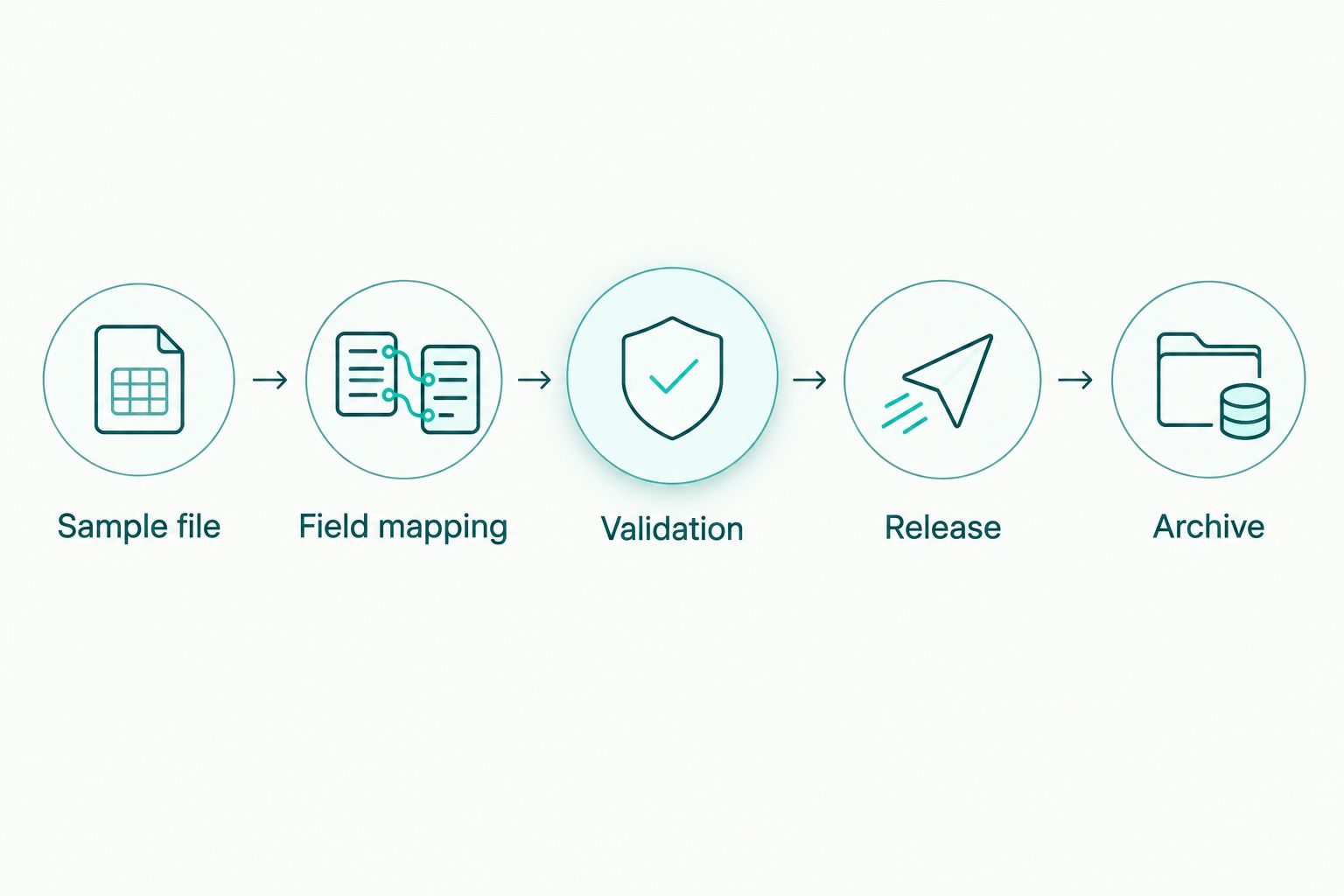
Check the import before replacing live data
Use the same acceptance process for every table. Your 2026 implementation plan should identify who approves a new file, who imports it, and how the team restores the previous version if validation fails.
- Sample file: Inspect the supplied structure before building mappings. Confirm how postal codes and rate fields are represented.
- Field mapping: Preserve ZIP codes as text when needed to retain leading zeros. Confirm whether the importer expects decimal rates or percentage values.
- Validation: Compare representative records with authoritative jurisdiction guidance for the relevant effective date. Include records from each required coverage area.
- Release: Replace the active dataset only after validation. Retain the source file and a record of when the replacement occurred.
- Archive: Keep prior versions where your audit and transaction-review process requires them. A current file is not automatically a historical-rate service.
Pay particular attention to unmatched records. Decide whether the application rejects the transaction, requests a corrected location, or routes the record for review. Silently assigning a default rate hides a data problem instead of resolving it.
Keep tax-rate updates separate from software changes where practical. That makes it easier to identify whether an unexpected result came from a new dataset, a mapping change, or transaction logic.
When a rate API is the better fit
A downloadable table suits workflows that import and maintain rate data internally. A rate API suits workflows that request a rate from a server during processing. Zip2Tax offers U.S. and Canada sales tax APIs as well as tables, so the choice starts with your operating model.
Best for downloadable tables: Controlled imports, locally maintained datasets, and applications already built around file-based rate data. The trade-off is responsibility for replacement and validation.
Best for rate APIs: Applications designed to request rates from an external service. The trade-off is responsibility for request handling, service errors, and integration behavior.
An API does not remove the need to check sourcing, taxability, or exemptions. For a 2026 integration decision, confirm geographic coverage, accepted location inputs, returned fields, and failure handling before choosing either delivery method.
How these tables are ranked
The ranking follows the buying criteria: geographic fit first, postal detail second, then import and maintenance requirements. Sales Tax Table - United States leads because it addresses the nationwide standard-ZIP use case; the other entries occupy distinct selected-state, extended-ZIP, and Canadian slots.
This is a use-case ranking of the named table options, not a benchmark of calculation accuracy or a claim that one supplier outperforms all alternatives. Choose the entry that matches your required fields and coverage.
Which downloadable sales tax table should you choose?
Choose Sales Tax Table - United States as the default for nationwide, standard-ZIP imports. Choose Sales Tax Table - Single State(s) when your requirement is limited to specified states.
Choose the corresponding SalesTax+4 table when your application retains and uses extended ZIP data. Choose GST/HST Table - Canada for a verified Canadian GST/HST import requirement.
Before approving the purchase, require a sample-file check and a documented update process. Those checks turn a suitable catalog selection into a usable data source.
FAQ
What's the best downloadable sales tax rate table for nationwide U.S. coverage?
Sales Tax Table - United States is the default in this guide for nationwide, standard-ZIP imports. Choose SalesTax+4® Sales Tax Table - U.S. instead when your application requires 9-digit ZIP data.
Which table should I choose if I only need certain states?
Sales Tax Table - Single State(s) fits selected-state, standard-ZIP requirements. SalesTax+4® Tax Table(s) - Single State(s) fits selected-state workflows that use extended ZIP data.
Is a ZIP+4 tax table better than a 5-digit ZIP table?
A ZIP+4 table fits workflows that retain and use the additional postal digits. It does not help a matching process that discards those digits, and postal detail alone does not resolve all jurisdiction or taxability questions.
Can I use these tax tables in a spreadsheet or accounting system?
Use a table only after its file structure passes your system's import checks. Request a sample and verify delimiters, headers, field types, leading zeros, and rate representation before replacing live data.
How often should I update a downloaded tax table?
Align your replacement process with the provider's documented update delivery and the effective dates relevant to your transactions. Confirm the schedule and assign an owner rather than assuming a downloaded file stays current.
Does the Canadian table replace a U.S. sales tax table?
GST/HST Table - Canada does not replace a U.S. sales tax table. Assess Canadian GST/HST requirements separately and verify any additional provincial tax fields your application needs.
Will a downloadable rate table guarantee sales tax compliance?
A downloadable rate table does not guarantee sales tax compliance. Your business must also address sourcing, taxability, exemptions, collection obligations, and filing requirements applicable to its transactions.
One last thing
A ZIP code is a postal identifier, not a taxing-jurisdiction boundary. Even a detailed postal table needs a matching process appropriate to the transaction and location.
Before selecting a 2026 table, inspect the location data your business actually retains. If extended ZIP information disappears between checkout and your accounting import, fix that break before choosing an extended-ZIP dataset. Buy the detail your application can use, then validate the result.