
Best overall for a U.S. POS that accepts imported rate data: Sales Tax Table - United States. Best for selected states: Sales Tax Table - Single State(s). Best for manual checks: Online Lookup with Calculator. This 2026 guide compares Zip2Tax sales tax software for POS systems by coverage, lookup method, and the work your team must handle.
- The best sales tax software for POS systems depends on whether your checkout imports tax tables or requests API lookups.
- Zip2Tax Sales Tax Table - United States is the default shortlist choice for a table-capable U.S. retail POS.
- SalesTax+4® Sales Tax Table - U.S. provides a 9-digit ZIP table; confirm your checkout can use that detail.
- Sales Tax API - USA fits request-based integration; Online Lookup with Calculator fits manual rate checks.
Why this matters
A tax rate is an input to checkout, not a complete tax decision. Your POS still needs rules for taxable merchandise, exemptions, transaction location, and the treatment of returns. Buying rate data does not establish those rules.
For your 2026 selection, start with the interface your checkout actually supports. A downloadable table and a request-based API solve different integration problems. Neither is useful if the POS cannot consume the data correctly.
Zip2Tax sales tax software for POS systems is best for retailers choosing between downloadable rate data, API lookups, and manual rate checks. The shortlist below ranks those options by workflow rather than claiming one product replaces every part of tax compliance.
What makes the best sales tax software for POS systems
Use these criteria before choosing a product:
- Coverage: Match the data to your U.S. states or Canadian operations, not to a hypothetical expansion plan.
- Location detail: Check whether your checkout accepts 5-digit ZIP data, 9-digit ZIP data, or another location input.
- Integration method: Establish whether the POS imports files, supports a custom API connection, or requires manual tax configuration.
- Update control: Assign responsibility for receiving, validating, and applying rate changes before they affect checkout.
- Tax-rule separation: Identify which system handles product taxability, exemptions, and transaction sourcing alongside the rate data.
- Verification: Require a repeatable way to compare the imported or returned rate with the amount calculated on a receipt.
For a 2026 purchase, request a sample file or API response before committing to an integration. Check field definitions, rate representation, location identifiers, and effective-date handling. A product name alone does not answer those questions.
Retail POS tax options at a glance
The order follows distinct purchasing needs. The first three choices prioritize downloadable U.S. tax tables; API options come after the table choices.
| Item | Best for | Standout feature | Key limitation or implementation requirement |
|---|---|---|---|
| Sales Tax Table - United States | Table-capable POS systems needing U.S. coverage | Complete U.S. sales tax table | Requires a controlled import and refresh process |
| Sales Tax Table - Single State(s) | Retailers selecting particular U.S. states | State-by-state selection | Selection must match every location the business needs |
| SalesTax+4® Sales Tax Table - U.S. | POS systems designed for ZIP+4 data | 9-digit ZIP table | Checkout must preserve and use the additional ZIP detail |
| Sales Tax API - USA | Custom U.S. checkout integrations | Server-based rate requests | Requires request handling and a failure policy |
| GST/HST Table - Canada | Canadian GST/HST table workflows | Canadian GST/HST rates in one table | GST/HST coverage is not the same question as every applicable Canadian tax |
| Sales Tax API - Canada | Request-based Canadian rate lookup | Connection to rate servers | Requires API integration and response validation |
| Online Lookup with Calculator | Occasional manual rate checks | Online lookup and calculation | Manual lookup is separate from an automated checkout connection |
1. Sales Tax Table - United States: best for U.S. table imports
Sales Tax Table - United States provides a complete U.S. sales tax table. It is the default starting point when your retail POS accepts imported rate data and your business needs U.S. coverage rather than selected states.
The buying decision is primarily operational. Your team needs to know how the file enters the POS, which fields the checkout uses, and who approves a replacement file.
Sales Tax Table - United States pros:
- Complete U.S. coverage in the stated product scope.
- A table-based option for systems that consume imported data.
- An alternative to selecting separate state products.
Sales Tax Table - United States cons:
- Import mapping and validation remain implementation tasks.
- A downloaded file needs a managed refresh process.
Best for: Retailers standardizing a table-based rate workflow across U.S. operations.
Verdict: Buy for a table-capable POS after validating a sample import.
2. Sales Tax Table - Single State(s): best for selected-state coverage
Sales Tax Table - Single State(s) lets you choose states instead of selecting the whole U.S. table. The product description identifies it as the option for buyers who do not need nationwide data and distinguishes it from the more detailed SalesTax+4 table.
For a business with a defined state footprint, this is the more focused shortlist choice. Document that footprint before ordering; store locations and the destinations you serve are not interchangeable lists.
Sales Tax Table - Single State(s) pros:
- Select the states your business needs.
- Uses the standard 5-digit ZIP table approach described in the catalog.
- Keeps the purchasing scope tied to a defined state list.
Sales Tax Table - Single State(s) cons:
- Expansion requires revisiting the selected coverage.
- Five-digit ZIP detail does not provide ZIP+4 detail.
Best for: Retailers whose table requirements are limited to selected U.S. states.
Verdict: Buy when your documented coverage list is narrower than the whole U.S.
3. SalesTax+4® Sales Tax Table - U.S.: best for ZIP+4 table workflows
SalesTax+4® Sales Tax Table - U.S. is the catalog's 9-digit ZIP table option. Choose it for an integration designed to retain and use ZIP+4 data, not simply because additional digits sound better.
ZIP codes support postal delivery; they are not themselves tax-jurisdiction boundaries. More ZIP detail is useful only when your checkout, location data, and matching rules use it correctly.
SalesTax+4® Sales Tax Table - U.S. pros:
- Provides the stated 9-digit ZIP table format.
- Offers a U.S. table option for ZIP+4-based matching.
- Distinguishes ZIP+4 requirements from standard ZIP table requirements.
SalesTax+4® Sales Tax Table - U.S. cons:
- A checkout that discards ZIP+4 detail cannot use that detail.
- Location matching still needs validation against actual transactions.
Best for: U.S. retailers with a POS data model built to consume ZIP+4 rate tables.
Verdict: Buy only after confirming end-to-end ZIP+4 handling.
Before choosing a tax table, check the import
Ask the supplier for field documentation and compare it with your POS import specification. Confirm the actual download format rather than assuming CSV, spreadsheet, or database compatibility.
These table products belong on the shortlist for the three U.S. table workflows above:


4. Sales Tax API - USA: best for custom U.S. checkout requests
Sales Tax API - USA connects your application to the provider's servers when you need a rate. Its product description states that the servers are continually updated. That delivery model differs from maintaining a downloaded file inside your own system.
Treat the API connection as a checkout dependency. Your developer must define request inputs, interpret responses, and decide what happens when a lookup fails.
Sales Tax API - USA pros:
- Supports server-based rate retrieval.
- Fits a request-based integration design.
- Provides an alternative to local table refreshes.
Sales Tax API - USA cons:
- Requires application integration and error handling.
- Rate retrieval does not replace merchandise taxability rules.
Best for: Retailers building a custom U.S. rate-lookup connection into checkout.
Verdict: Buy after a working integration demonstration, not on the API label alone.
5. GST/HST Table - Canada: best for Canadian GST/HST imports
GST/HST Table - Canada places Canadian GST/HST rates in one table. It is the table-first choice for a Canadian workflow that needs those rates and can import the supplied data.
Keep the stated scope explicit. Canadian tax configuration also requires checking which taxes apply to the transaction; a GST/HST table name should not be read as a promise covering every provincial tax requirement.
GST/HST Table - Canada pros:
- Provides a Canadian GST/HST table.
- Collects the stated rates in one table.
- Supports evaluating a file-based Canadian rate workflow.
GST/HST Table - Canada cons:
- Requires matching the table fields to the POS.
- Additional tax requirements need separate confirmation.
Best for: Businesses seeking Canadian GST/HST data for a table-capable system.
Verdict: Buy for the stated GST/HST scope after checking your complete tax configuration.
6. Sales Tax API - Canada: best for Canadian request-based lookup
Sales Tax API - Canada connects your application to the provider's rate servers. The product description states that those servers are continually updated, making this the Canadian request-based alternative to importing a table.
Confirm the response fields for each province you serve. Your acceptance test should establish which taxes the response contains and how the POS applies them to a transaction.
Sales Tax API - Canada pros:
- Provides a Canadian rate-lookup API option.
- Retrieves rates through a server connection.
- Fits systems designed around lookup requests.
Sales Tax API - Canada cons:
- Requires request, response, and error-handling development.
- Tax coverage must match the business's provincial requirements.
Best for: Canadian operations with a developer-supported API integration.
Verdict: Buy after verifying provincial coverage and checkout behavior.
7. Online Lookup with Calculator: best for manual verification
Online Lookup with Calculator provides online sales and use tax rate lookup and calculation. It fits a person checking a rate or reviewing a calculation rather than a checkout automatically requesting data.
Use the lookup as a separate verification workflow. A staff member consulting a calculator does not create an automated connection between that calculator and the POS.
Online Lookup with Calculator pros:
- Combines rate lookup with calculation.
- Fits occasional staff-led checks.
- Offers a manual alternative to file or API integration.
Online Lookup with Calculator cons:
- Staff must perform the lookup.
- Manual results need a separate process for use in checkout.
Best for: Retailers checking individual rates or investigating receipt calculations.
Verdict: Buy for manual verification; skip as a substitute for automated POS integration.
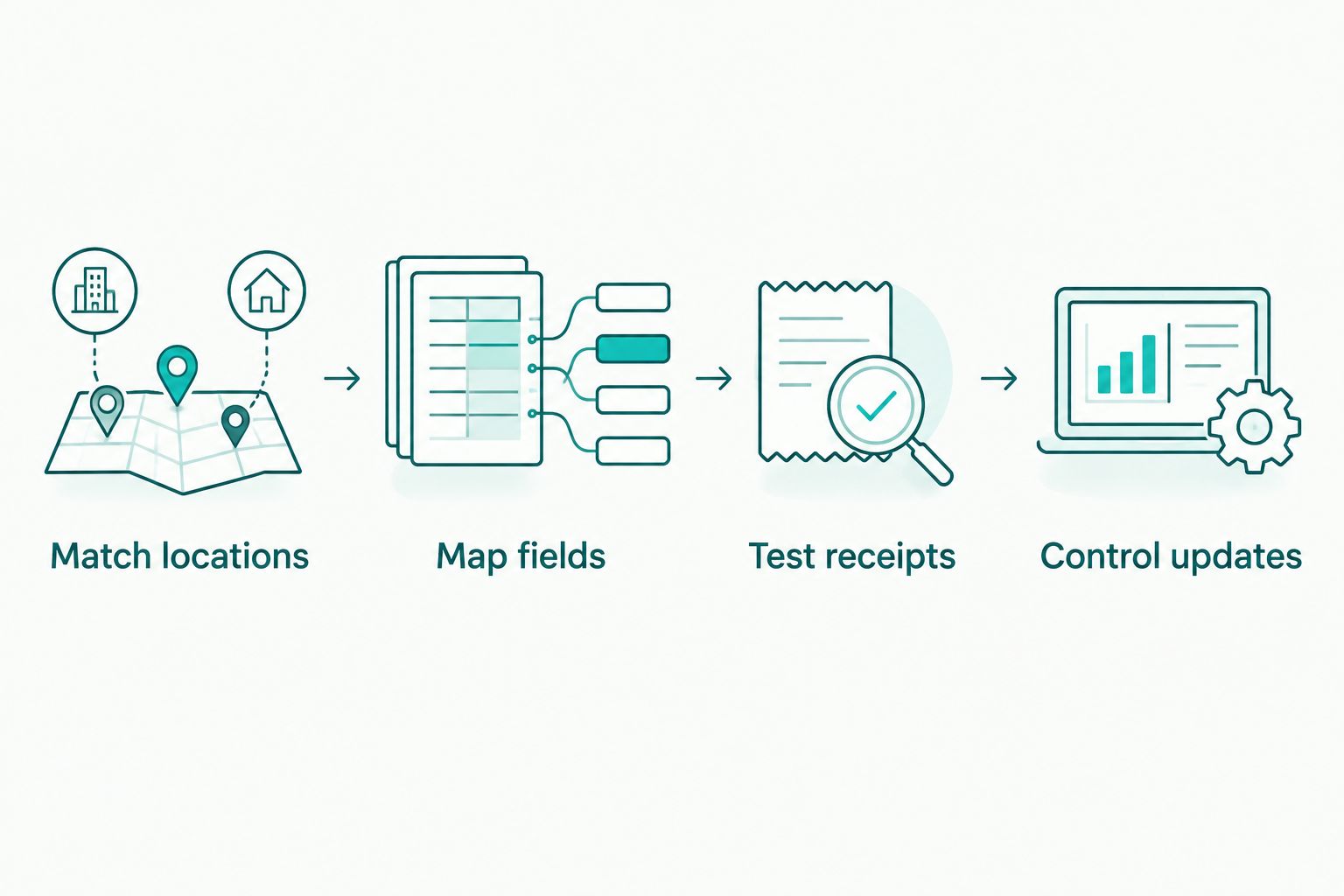
Put the selected rate source through acceptance checks
Use these 4 acceptance checks for your 2026 implementation. Keep a record of the input, expected treatment, returned or imported rate, and receipt result.
- Match locations: Check actual store and customer locations against the identifiers your integration uses.
- Map fields: Confirm decimal handling, rate components, and the relationship between data fields and POS tax settings.
- Test receipts: Include taxable merchandise, exempt transactions, and returns using rules confirmed for your business.
- Control updates: Assign an owner, approval step, deployment method, and rollback procedure for rate-data changes.
The sequence applies to either delivery method. A table import and an API response both need to produce the intended checkout calculation.
How the ranking works
This 2026 ranking uses the stated product scope and delivery method: U.S. tables first, selected-state and ZIP+4 needs next, then APIs, Canadian coverage, and manual lookup. Each option owns a different use case.
The ranking does not assume native POS connectors, a particular download format, filing services, or exemption-certificate management. Confirm those requirements separately before treating any rate-data product as a complete compliance system.
Which option should you choose?
For a table-capable U.S. retail POS, shortlist Sales Tax Table - United States first. Choose Sales Tax Table - Single State(s) when your documented needs cover selected states, and SalesTax+4® Sales Tax Table - U.S. when your integration uses ZIP+4 detail.
For your 2026 API project, select the country-specific API only after proving the connection works with checkout. Canadian table buyers should start with the GST/HST table and verify the rest of their tax requirements.
Zip2Tax's table, API, and lookup options address different rate-data workflows. Select the workflow first; then validate the product against it.
FAQ
What's the best sales tax software for POS systems in 2026?
Sales Tax Table - United States is the default shortlist choice for a U.S. POS that accepts imported tax-rate tables. Choose a selected-state table, ZIP+4 table, or API when your coverage or integration requirements call for it.
Is a sales tax table better than an API for retail checkout?
A sales tax table fits an import-based checkout; an API fits a request-based checkout. The better choice is the delivery method your POS supports and your team can maintain.
Does Zip2Tax work with my existing POS system?
Compatibility must be established against your POS import specification or API integration requirements. Ask for sample data or a working request and validate the resulting receipt calculation before deployment.
What is the difference between a 5-digit and 9-digit ZIP tax table?
A 9-digit ZIP table uses ZIP+4 detail, while a 5-digit ZIP table uses the standard ZIP code. Your checkout must retain and use the additional detail for the ZIP+4 table to serve its intended purpose.
What file format should I request for a tax table?
Request the format and field definitions your POS import process requires. Confirm delimiters, column mapping, rate representation, and effective-date handling with a sample file rather than assuming compatibility.
Can I use a Canadian GST/HST table for every Canadian tax requirement?
A GST/HST table should be evaluated for its stated GST/HST scope. Check any additional provincial tax requirements and product-taxability rules separately before configuring checkout.
How should I manage sales tax rate updates?
Assign an owner to validate and deploy rate-data changes before they affect checkout. For APIs, also test response handling and lookup failures; for tables, control file replacement and rollback.
Does rate lookup software handle exemptions and tax returns?
Do not treat rate lookup as a substitute for exemption handling or tax-return preparation. Confirm those functions separately in your POS, accounting workflow, or compliance service.
One last thing
More detailed rate data cannot fix a checkout that ignores the detail. Before selecting a 9-digit ZIP table, trace one ZIP+4 value from customer entry through storage, matching, and the receipt calculation. For Zip2Tax buyers, that check separates a useful data upgrade from an unused field.