
Best overall for a finance-managed tracker: Microsoft Excel. Best for multichannel reporting: Microsoft Power BI. Best for shared reviews: Google Sheets. This 2026 guide separates nexus monitoring from rate calculation: Zip2Tax supplies tax-rate tools and downloadable tables, while your nexus workflow must track sales, physical presence, and state-specific obligations.
- The best sales tax nexus tracking tools connect state-level sales data with documented nexus rules and review decisions.
- Microsoft Excel is the default recommendation for a finance team maintaining a controlled, state-by-state nexus register.
- Microsoft Power BI suits multichannel reporting; Google Sheets suits shared nexus reviews.
- Zip2Tax sales tax tables support rate calculation alongside a separate nexus tracking process.
Why this matters
A tax rate answers how much to calculate. Nexus answers whether your business has an obligation in a jurisdiction. Buying one does not resolve the other.
Economic nexus analysis depends on a state's current rules and your activity there. Physical presence requires separate review: employees, inventory, offices, and other activities can matter independently of remote-sales thresholds. Marketplace transactions also require careful treatment because collection responsibility and threshold inclusion are different questions.
For your 2026 selection, start with the decision your team needs to make. A useful tracker identifies the jurisdiction, the applicable measurement period, the supporting transactions, and the person responsible for reviewing the result. A dashboard without that evidence is only a sales report.
What makes the best sales tax nexus tracking tools
Use these criteria before choosing a tool:
- State-specific rules: Record the applicable sales definition, measurement period, threshold, effective date, and authoritative state source.
- Complete transaction data: Include relevant channels, refunds, marketplace activity, and customer destinations without counting the same order twice.
- Physical-presence review: Maintain a separate record of inventory locations, employees, facilities, and other activities requiring analysis.
- Traceable decisions: Preserve the data and rule version supporting each nexus determination, registration decision, and unresolved question.
- Review ownership: Assign an owner to investigate exceptions and approve the next action. An alert is not a completed decision.
- Separate rate integration: Evaluate downloadable tax tables or an API independently from the system monitoring nexus.
Do not select a tool solely because it displays state totals. Ask whether you can reconstruct the result after a rule changes or a transaction is corrected.
Nexus tracking options at a glance
These options serve different workflows. The ranking reflects suitability for the stated use case, not a claim that a general-purpose application contains current nexus law.
| Option | Best for | Standout capability | Key limitation |
|---|---|---|---|
| Microsoft Excel | Finance-managed nexus registers | Formulas, tables, and pivot-based review | Your team maintains the rules and controls |
| Microsoft Power BI | Multichannel reporting | Data models and interactive reporting | Reporting does not supply a legal determination |
| Google Sheets | Shared review workflows | Collaborative spreadsheet editing | Rule maintenance and change control remain your responsibility |
| ERP sales reports | Reconciliation to accounting records | Reporting from the transaction system of record | Coverage depends on configuration and imported channels |
None of these options should be treated as a preconfigured nexus engine. Their usefulness depends on how you structure the data, maintain jurisdiction rules, and document decisions.
1. Microsoft Excel: best for a finance-managed nexus register
Microsoft Excel lets you organize transaction exports, calculate state totals, and maintain a review register in the same workbook. Tables, formulas, and pivot tables support a structured analysis without requiring a separate reporting platform.
Use distinct worksheets for raw transactions, jurisdiction rules, physical-presence records, and decisions. Keep imported source data separate from manual adjustments so a reviewer can follow the calculation.
Microsoft Excel pros:
- Supports a visible, state-by-state calculation structure.
- Lets reviewers inspect formulas and underlying transaction rows.
- Accommodates a separate physical-presence register.
- Supports exports and retained workbook versions for review records.
Microsoft Excel cons:
- Does not maintain state nexus rules for you.
- Requires controls against overwritten formulas and inconsistent imports.
- Becomes harder to manage when many people maintain separate copies.
Best for: A finance team that can assign a workbook owner and review changes consistently.
For 2026, make Microsoft Excel the default when a controlled register meets your actual workload. Define the import procedure, protect calculation cells, and require approval before changing rule fields. Do not use a workbook copied from an old project without checking its jurisdiction assumptions.
Verdict: Buy into Microsoft Excel as a controlled tracking workflow; skip an undocumented spreadsheet.
2. Microsoft Power BI: best for multichannel reporting
Microsoft Power BI brings datasets into a reporting model and presents results through interactive reports. A nexus dashboard can show state-level sales, channel contributions, and exceptions once your team defines the underlying model.
The important work happens before the chart. Match destination fields, reconcile order identifiers, and decide how adjustments enter the model. A visually clear report can still produce an incorrect total if its inputs overlap.
Microsoft Power BI pros:
- Supports reporting across multiple prepared datasets.
- Lets reviewers move between summary views and supporting detail.
- Separates reporting presentation from the underlying data model.
- Helps expose channel-level differences during reconciliation.
Microsoft Power BI cons:
- Requires data-model design and ongoing maintenance.
- Does not establish which state rules apply to your business.
- Needs a separate record of decisions, approvals, and registration actions.
Best for: Businesses consolidating sales from multiple systems and needing repeatable state-level reporting.
Ask for a demonstration using your transaction structure, not a generic dashboard. The demonstration should show duplicate handling, refunds, marketplace classification, and the applicable measurement period. Your reviewer should be able to explain why a transaction entered a state total.
Verdict: Buy into Microsoft Power BI for consolidated reporting; skip it as a substitute for nexus analysis.
3. Google Sheets: best for shared nexus reviews
Google Sheets provides a shared spreadsheet environment for collecting information and maintaining a review register. Collaborative editing and version history support a workflow in which finance, operations, and an outside adviser contribute to the same record.
Use Google Sheets when the main difficulty is coordinating people rather than combining complex datasets. Give each jurisdiction a clear review status and record the person who approved the decision.
Google Sheets pros:
- Supports shared editing without circulating separate workbook attachments.
- Provides version history for reviewing document changes.
- Lets contributors record operational facts alongside sales analysis.
- Supports a straightforward register of questions and assigned owners.
Google Sheets cons:
- Does not provide maintained nexus rules by default.
- Requires permission controls and protected calculation areas.
- Manual editing still creates opportunities for inconsistent entries.
Best for: Teams coordinating nexus reviews across finance, operations, and advisers.
In your 2026 register, distinguish a recorded fact from an approved conclusion. An operations employee can report inventory in a state; the person responsible for tax review should document what that fact means for the business. Shared access is not shared accountability.
Verdict: Buy into Google Sheets for coordinated review; skip an unrestricted sheet with no approval owner.
4. ERP sales reports: best for accounting reconciliation
ERP sales reports provide a starting point when your accounting system contains the relevant transaction records. They help your finance team connect a nexus calculation to recorded sales, credits, and adjustments.
The exact reporting fields depend on your ERP and configuration. Before relying on an export, confirm that it includes the customer destination and distinguishes the transaction types your state analysis requires.
ERP sales reports pros:
- Connect analysis to the accounting transaction record.
- Support reconciliation of sales and recorded adjustments.
- Reduce dependence on separately maintained summaries when source coverage is complete.
ERP sales reports cons:
- Can omit channels or marketplace details not imported into the ERP.
- Depend on the quality of destination and classification fields.
- Do not necessarily include nexus rules or physical-presence tracking.
Best for: Businesses prioritizing reconciliation between nexus totals and accounting records.
Compare the ERP export with channel reports before treating it as complete. Identify timing differences and missing transactions explicitly. The objective is a reproducible explanation, not forcing unrelated reports to display the same total.
Verdict: Hold ERP sales reports as the reconciliation foundation; skip them as the only nexus control.
How we ranked these options
Microsoft Excel ranks first for a finance-managed register because its calculations and supporting records can sit together in an inspectable workflow. Microsoft Power BI takes the multichannel reporting slot, Google Sheets the shared-review slot, and ERP sales reports the accounting-reconciliation slot.
The criteria are rule maintenance, data completeness, physical-presence coverage, traceability, and ownership. These are workflow recommendations, not test scores or claims that the applications contain current state tax rules.
Where downloadable tax tables fit
Zip2Tax sales tax tables suit businesses that need downloadable U.S. rate data alongside a separate nexus tracker. Establish the obligation first, then select the rate-data format your calculation system can use.
Zip2Tax offers U.S. tables covering the country or selected states. The supplied product descriptions distinguish 5-digit ZIP tables from SalesTax+4® tables using 9-digit ZIP codes. That distinction concerns rate lookup detail, not whether your business has nexus.
Before choosing downloadable tables, ask for the file format, field definitions, update process, effective-date handling, and import requirements. Match the coverage to your calculation workflow. Do not assume that a downloadable file includes registration monitoring, product-taxability decisions, or returns preparation.


Best for: Businesses importing rate data into an existing calculation process.
Advantages: Downloadable tables provide a distinct rate-data layer, with U.S. and selected-state options stated in the product descriptions.
Limitations: Tax-rate data does not determine nexus. Your team must also verify format compatibility and manage how updated files enter production.
API buyers have a different integration question. Zip2Tax offers U.S. and Canada sales tax APIs for rate requests, alongside Canadian GST/HST tables. Confirm request fields, response structure, geographic coverage, and error handling before integration; a rate response does not resolve a registration obligation.
Build a review process before buying more software
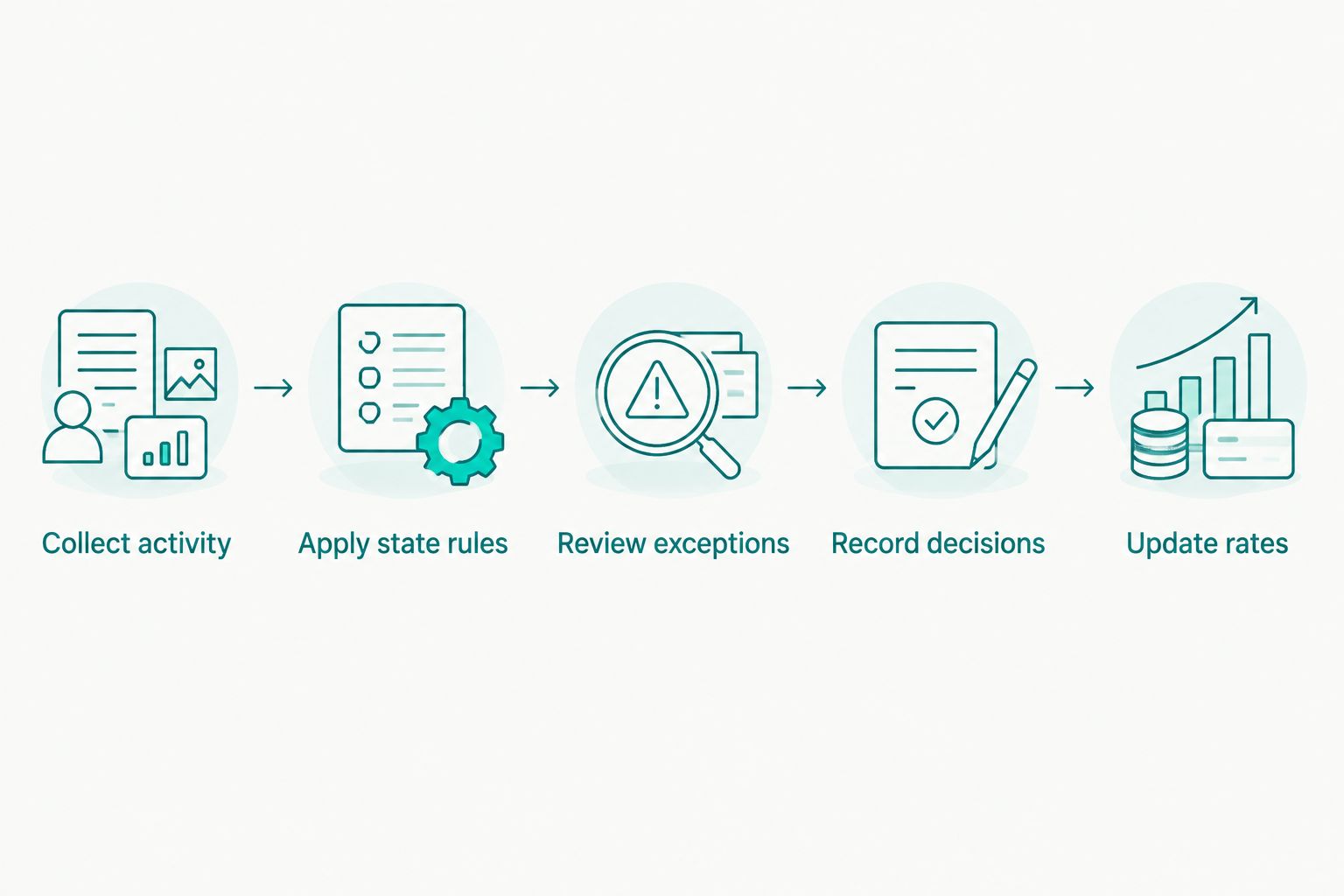
A workable 2026 nexus process separates data collection, rule review, and action. Use the following sequence with whichever tracking option you select.
- Collect activity: Gather transactions by destination and channel, plus a separate inventory, employee, and facility record.
- Apply state rules: Document the authoritative source, effective date, included sales, and relevant measurement period.
- Review exceptions: Investigate missing destinations, duplicates, refunds, marketplace treatment, and unexplained differences.
- Record decisions: Preserve the calculation, reviewer, conclusion, and next action.
- Update rates: After the obligation is established, connect the appropriate rate-data source to your calculation workflow.
Use 3 review statuses: unreviewed, under review, and approved. Define what evidence moves a jurisdiction between those statuses. An approved status should identify the decision and its supporting record, not simply indicate that someone opened the file.
Which nexus tracking option should you choose?
Choose Microsoft Excel unless your reporting or collaboration requirements justify a different workflow. Use Microsoft Power BI when consolidating channels is the central problem, Google Sheets when coordinating reviewers is the central problem, and ERP sales reports when reconciling accounting records is the central problem.
If you need software that maintains nexus rules or generates threshold alerts, require the vendor to demonstrate those functions using your data before purchase. Ask how physical presence, marketplace sales, rule effective dates, and corrections are handled. Do not infer those capabilities from a sales-tax calculation feature.
Keep the rate-data decision separate. Downloadable tables and APIs belong in the calculation layer after the nexus review establishes the relevant obligation.
FAQ
What's the best sales tax nexus tracking tool for a finance team?
Microsoft Excel is the default recommendation for a finance team maintaining a controlled, state-by-state nexus register. The team must maintain current rules, reconcile transaction data, and document approvals.
Is Microsoft Power BI better than Excel for nexus tracking?
Microsoft Power BI is the better fit when consolidating multiple datasets and producing interactive reports is the main requirement. Microsoft Excel is the simpler fit for a finance-managed review register; neither supplies a nexus determination by itself.
Can Google Sheets track sales tax nexus?
Google Sheets can support a nexus register and shared review workflow. Your team must supply the rules, transaction data, physical-presence information, and approval controls.
Does Zip2Tax determine whether my business has nexus?
Zip2Tax's supplied offerings describe rate lookup tools, APIs, and downloadable tax tables, not a nexus determination service. Use a separate process to establish obligations before applying tax rates.
Do marketplace sales belong in a nexus tracker?
Marketplace sales belong in the data you review, but their treatment depends on the applicable jurisdiction's rules. Do not assume marketplace collection removes every seller obligation or excludes those sales from every threshold.
Can a ZIP-code tax table replace nexus tracking?
A ZIP-code tax table cannot replace nexus tracking. Rate data supports calculation, while nexus review determines whether the business has an obligation in the jurisdiction.
What should I check before choosing a nexus tool in 2026?
Check state-rule coverage, measurement periods, transaction completeness, physical-presence tracking, and decision records. Require a demonstration showing how the tool handles your channels, adjustments, and review process.
One last thing
Never turn on collection solely because a dashboard changes color. Record the applicable rule, verify the underlying activity, and document the registration or collection decision with the responsible reviewer. That record is more useful than an unexplained alert.