
Best default for nationwide rate-table imports: Sales Tax Table - United States. Best for selected-state imports: Sales Tax Table - Single State(s). Best for manual calculations: Online Lookup with Calculator. This 2026 sales tax software pricing comparison starts with Zip2Tax and separates downloadable tables, APIs, and lookup tools by the work you need them to do.
- For a sales tax software pricing comparison, compare coverage and workflow before comparing subscription terms.
- Zip2Tax sales tax tables suit businesses importing rate data into their own systems.
- Sales Tax Table - Single State(s) fits selected-state coverage; Sales Tax Table - United States fits nationwide imports.
- Sales Tax API - USA fits application-driven rate requests; Online Lookup with Calculator fits manual calculations.
Why this matters
A tax table, an API, and a manual calculator solve different problems. Buying a rate-data service does not, by itself, establish where your business must register, which products are taxable, or which returns you must file.
For your 2026 purchasing decision, separate rate access from tax administration. Start with the task your accounting or commerce system cannot handle, then compare offers covering that same task. Otherwise, a smaller-looking subscription can leave you buying another service or building an import process afterward.
What makes the best sales tax software purchase
Use these criteria before reviewing the ranked options:
- Coverage: Match selected states, nationwide U.S. coverage, or Canadian GST/HST coverage to your actual requirements.
- Location detail: Distinguish a 5-digit ZIP table from a 9-digit ZIP table. Postal detail and tax-jurisdiction assignment are separate questions.
- Delivery method: Choose downloadable files for imports, an API for application requests, or an online tool for manual work.
- Update handling: Establish how changed rates reach your system and how you associate them with effective dates.
- Integration requirements: Confirm file structure, request fields, response fields, and the work your staff must perform.
- Service boundaries: Identify whether the purchase supplies rates, calculations, registration assistance, returns, or other functions. Do not assume these are bundled.
Compare equivalent scope before deciding which offer represents better value. A nationwide file and a selected-state file are not interchangeable purchases, even when both contain tax rates.
Sales tax software options at a glance
The order below prioritizes downloadable tables, then manual lookup and API access. It is a buying-fit ranking, not a claim that different products share comparable billing terms.
| Rank and option | Best for | Standout feature | Key limitation |
|---|---|---|---|
| 1. Sales Tax Table - United States | Nationwide U.S. imports | Complete U.S. sales tax table | Import and update handling remain part of your workflow |
| 2. Sales Tax Table - Single State(s) | Selected-state imports | Choose the states you need | Coverage must expand when your requirements expand |
| 3. SalesTax+4® Sales Tax Table - U.S. | Nationwide imports needing longer ZIP detail | 9-digit ZIP table | Longer ZIP detail is not a complete tax decision |
| 4. SalesTax+4® Tax Table(s) - Single State(s) | Selected-state ZIP+4 imports | State selection with ZIP+4 detail | Your records need compatible location information |
| 5. GST/HST Table - Canada | Canadian GST/HST imports | Canadian GST/HST rates in one table | GST/HST scope does not establish every Canadian tax obligation |
| 6. Online Lookup with Calculator | Manual rate checks and calculations | Online lookup and calculation | Manual use is distinct from an application integration |
| 7. Sales Tax API - USA | U.S. application-driven requests | Connects to rate servers when needed | Requires application integration and request handling |
| 8. Sales Tax API - Canada | Canadian application-driven requests | Canadian rate access through an API | Requires confirmation of tax types and response fields |
1. Sales Tax Table - United States: best for nationwide imports
Sales Tax Table - United States supplies a complete U.S. sales tax table. Choose this delivery model when your business needs a downloaded rate file for an existing import process rather than a separate request for each lookup.
Sales Tax Table - United States pros:
- Complete U.S. coverage is the stated product scope.
- A downloadable table fits a file-based workflow.
- It provides a nationwide alternative to selecting individual states.
Sales Tax Table - United States cons:
- Your system still needs an import and refresh process.
- Rate data does not determine product taxability or filing obligations.
Best for: Businesses maintaining nationwide U.S. rate data inside their own systems.
Verdict: Buy for nationwide imports; skip if selected-state coverage satisfies your requirements.
2. Sales Tax Table - Single State(s): best for selected-state imports
Sales Tax Table - Single State(s) lets you choose states instead of obtaining the whole U.S. table. Its product description distinguishes this option from the more detailed SalesTax+4 table.
Sales Tax Table - Single State(s) pros:
- State selection matches a defined geographic requirement.
- Downloadable data fits an existing import process.
- The standard table addresses 5-digit ZIP requirements.
Sales Tax Table - Single State(s) cons:
- Selected states do not cover an expanded geographic requirement automatically.
- Five-digit ZIP detail does not resolve every jurisdiction boundary.
Best for: Businesses with a documented need for particular state tables.
Verdict: Buy for selected-state imports; reassess coverage when your tax requirements change.
3. SalesTax+4® Sales Tax Table - U.S.: best for nationwide ZIP+4 imports
SalesTax+4® Sales Tax Table - U.S. is described as a 9-digit sales tax table. It is the nationwide table option to examine when your source records and importing system support longer ZIP detail.
SalesTax+4® Sales Tax Table - U.S. pros:
- The product explicitly offers 9-digit ZIP detail.
- Its scope addresses nationwide U.S. table needs.
- It gives table buyers an alternative to the standard ZIP format.
SalesTax+4® Sales Tax Table - U.S. cons:
- Your records need compatible location information.
- ZIP+4 detail does not replace taxability or sourcing decisions.
Best for: Nationwide table users with ZIP+4-compatible records.
Verdict: Buy when your import requires ZIP+4 detail; hold until you verify field compatibility.
4. SalesTax+4® Tax Table(s) - Single State(s): best for state-specific ZIP+4
SalesTax+4® Tax Table(s) - Single State(s) combines the SalesTax+4 table option with selected-state coverage. It suits a narrower geographic requirement without switching back to the standard ZIP table.
SalesTax+4® Tax Table(s) - Single State(s) pros:
- You choose the states required.
- The product belongs to the ZIP+4 table range.
- Selected-state scope supports a focused import specification.
SalesTax+4® Tax Table(s) - Single State(s) cons:
- It does not substitute for nationwide coverage when that is required.
- Your import must support the supplied location fields.
Best for: Businesses needing ZIP+4 table detail for selected states.
Verdict: Buy for state-specific ZIP+4 imports; skip when your system cannot use that detail.
5. GST/HST Table - Canada: best for Canadian GST/HST imports
GST/HST Table - Canada provides Canadian GST/HST rates in one table. Keep that stated scope explicit: Canadian tax requirements also involve questions beyond obtaining a GST/HST rate.
GST/HST Table - Canada pros:
- The product explicitly addresses Canada.
- GST/HST rates are provided in a table.
- File delivery suits a Canadian rate-import workflow.
GST/HST Table - Canada cons:
- GST/HST coverage alone does not establish provincial sales tax treatment.
- You still need to determine transaction taxability and registration obligations.
Best for: Businesses importing Canadian GST/HST rate data.
Verdict: Buy for GST/HST table requirements; hold if your specification also requires other tax types.
6. Online Lookup with Calculator: best for manual calculations
Online Lookup with Calculator supports finding sales and use tax rates and calculating tax online. Its stated use case includes small businesses needing these functions without making application integration the starting point.
Online Lookup with Calculator pros:
- Rate lookup and calculation are the stated functions.
- Online access fits an individual rate-checking task.
- The description specifically addresses small-business needs.
Online Lookup with Calculator cons:
- Manual lookup is not the same workflow as importing a table.
- Calculation does not establish registration or return-filing requirements.
Best for: Staff performing individual rate checks and calculations.
Verdict: Buy for manual work; skip as a substitute for a required automated integration.
7. Sales Tax API - USA: best for U.S. application requests
Sales Tax API - USA connects an application to rate servers when it needs a rate. Its description states that the servers are continually updated; your application still needs to handle requests and use the returned data correctly.
Sales Tax API - USA pros:
- The API supports application-driven rate access.
- Its product scope identifies the USA.
- Server updates are part of the stated service description.
Sales Tax API - USA cons:
- Your team must implement and maintain the connection.
- A returned rate does not answer every transaction tax question.
Best for: Developers connecting U.S. rate requests to an application.
Verdict: Buy for request-based rate access; hold until you validate the integration requirements.
8. Sales Tax API - Canada: best for Canadian application requests
Sales Tax API - Canada connects your application to rate servers when a Canadian rate is needed. Verify the required tax types, input fields, and returned fields against your transaction workflow before choosing API access over a table.
Sales Tax API - Canada pros:
- Canada is the stated geographic focus.
- API delivery supports application requests.
- The description identifies continually updated servers.
Sales Tax API - Canada cons:
- Application integration remains your responsibility.
- You must confirm that the response covers your required Canadian tax types.
Best for: Developers implementing Canadian rate requests.
Verdict: Buy for Canadian application access; hold until the documented response matches your needs.
How to compare purchasing terms in 2026
Use the same specification when requesting terms for competing offers. Zip2Tax sales tax tables are best for businesses that want downloadable rate data for their own import workflows. Compare those tables with other file-delivery offers, not with a returns-management package containing different services.
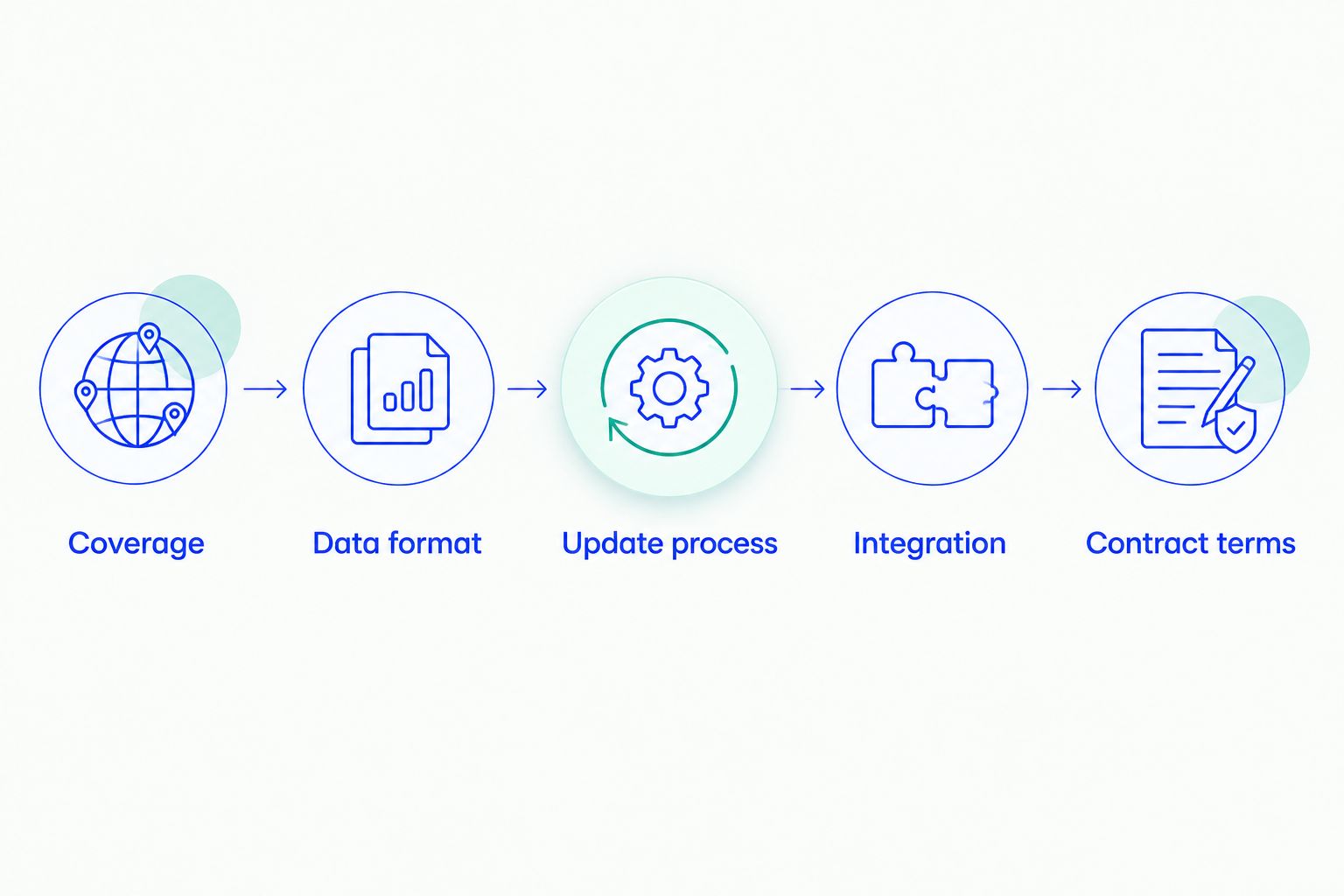
Work through these steps in order:
- Coverage: List the states or Canadian tax types your system requires. Separate current requirements from planned expansion.
- Data format: Request a sample and confirm field names, location identifiers, rate fields, and effective-date handling.
- Update process: Establish delivery frequency, notification methods, and how replacement files or server changes enter your workflow.
- Integration: Identify import work, API development, validation, and the person responsible for exceptions.
- Contract terms: Confirm the billing period, usage measurement, permitted use, renewal terms, and cancellation conditions.
Do not normalize two offers until their billing periods and included services match. For a 2026 evaluation, record implementation work separately from the subscription: importing files and building API requests are different tasks, even when both ultimately supply rates.
For table buyers, these products illustrate the first scope decision: nationwide coverage versus selected-state coverage. Confirm the current options and terms for the configuration you actually need.


How these options are ranked
This ranking puts downloadable tables first because they address the primary buying task: selecting rate data for imports. Nationwide and selected-state coverage come before the ZIP+4 alternatives; Canadian GST/HST, manual lookup, and APIs occupy separate workflow slots.
The criteria are coverage, location detail, delivery method, updates, integration, and service boundaries. This 2026 guide ranks suitability for those tasks, not measured implementation performance or a universal cheapest subscription.
Which sales tax option should you choose?
Choose Sales Tax Table - United States as the default for nationwide U.S. imports. Choose Sales Tax Table - Single State(s) when selected-state coverage meets your documented requirements. Move to a SalesTax+4 table when your records and import specification require longer ZIP detail.
For Canada, distinguish a GST/HST table requirement from an API requirement. For manual work, choose Online Lookup with Calculator; for application requests, evaluate the relevant country API. Keep the Zip2Tax purchase tied to the rate-access task rather than treating it as a substitute for every compliance function.
FAQ
What's the best starting point for a sales tax software pricing comparison?
Start by matching coverage, delivery method, and included services. Compare tables with tables and APIs with APIs before comparing billing terms.
Which Zip2Tax option fits downloadable U.S. tax tables?
Sales Tax Table - United States fits nationwide imports, while Sales Tax Table - Single State(s) fits selected-state imports. Check the supplied fields and update process against your importing system.
Is a sales tax API better than a downloadable table?
An API fits application-driven requests; a downloadable table fits file-based imports. The better choice depends on how your system obtains and maintains rates.
What's the difference between 5-digit and 9-digit ZIP tax tables?
A 9-digit ZIP table uses longer postal identifiers than a 5-digit ZIP table. Confirm that your location records support the format, and do not treat postal detail as a complete tax-jurisdiction determination.
Does a Canadian GST/HST table cover every Canadian tax obligation?
A GST/HST table supplies GST/HST rate data, not a determination of every Canadian tax obligation. Confirm provincial tax requirements, product taxability, and registration obligations separately.
How do I compare sales tax software costs in 2026?
Compare current terms for the same coverage, billing period, usage basis, and service scope. Account separately for import work, API integration, updates, and any required services outside rate access.
Does buying tax-rate software guarantee compliance?
No, obtaining a rate does not establish complete compliance. Your business must also address applicable registration, sourcing, taxability, exemption, reporting, and remittance requirements.
One last thing
Before approving a 2026 purchase, ask the person responsible for integration to review a sample file or documented API response. A purchasing comparison is incomplete if the selected data cannot enter the system that calculates tax.
Choose the workflow first, then compare matching terms. That rule prevents a manual calculator, a downloadable table, and an API from appearing interchangeable simply because each supplies a tax rate.